
Welcome to my extensive Chauffeur Taxi Booking System WordPress plugin review.
Running a taxi or limo business with random contact forms and WhatsApp messages is… chaos.
You know it. I know it. Clients know it.
Everyone knows it!

That’s where Chauffeur comes in – a serious, enterprise-style booking engine you drop into your WP site and suddenly you’ve got routes, cars, drivers, payments, pricing rules and calendars all talking to each other.
Super. Convenient.
With thousands of customers, a strong rating and years of updates, this isn’t some weekend side project.
It’s a battle-tested plugin with a one-time $79 license, lifetime updates and 6 months of support.
Let’s break it down properly and see if it really deserves a spot on your (or your client’s) website.
(Hint: It does!)
This post covers:
- Chauffeur Taxi Booking System WordPress Plugin Review
- Conclusion: Is The Chauffeur Taxi Booking System Plugin Worth It?
- FAQs About Chauffeur Taxi Booking System WP Plugin
Chauffeur Taxi Booking System WordPress Plugin Review
1. What Is The Chauffeur Taxi Booking System WordPress Plugin?
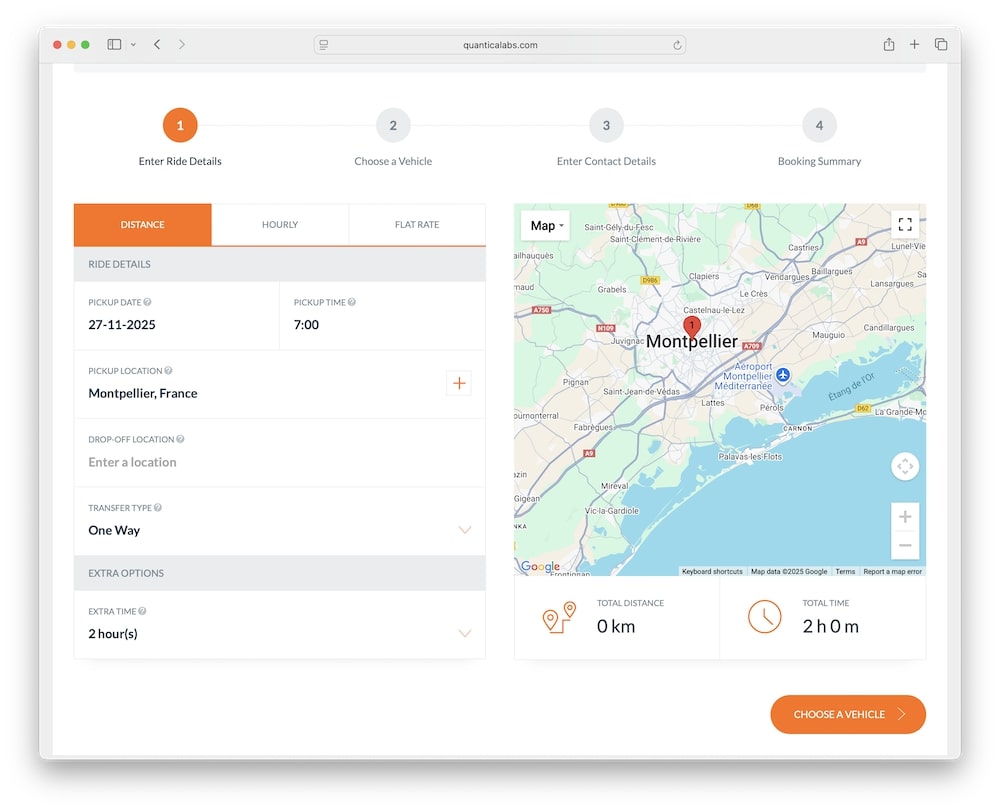
Chauffeur Taxi Booking System is a premium WordPress plugin that turns your site into a full booking platform for taxis, chauffeur services, limo hire, shuttles, tours, and airport transfers.
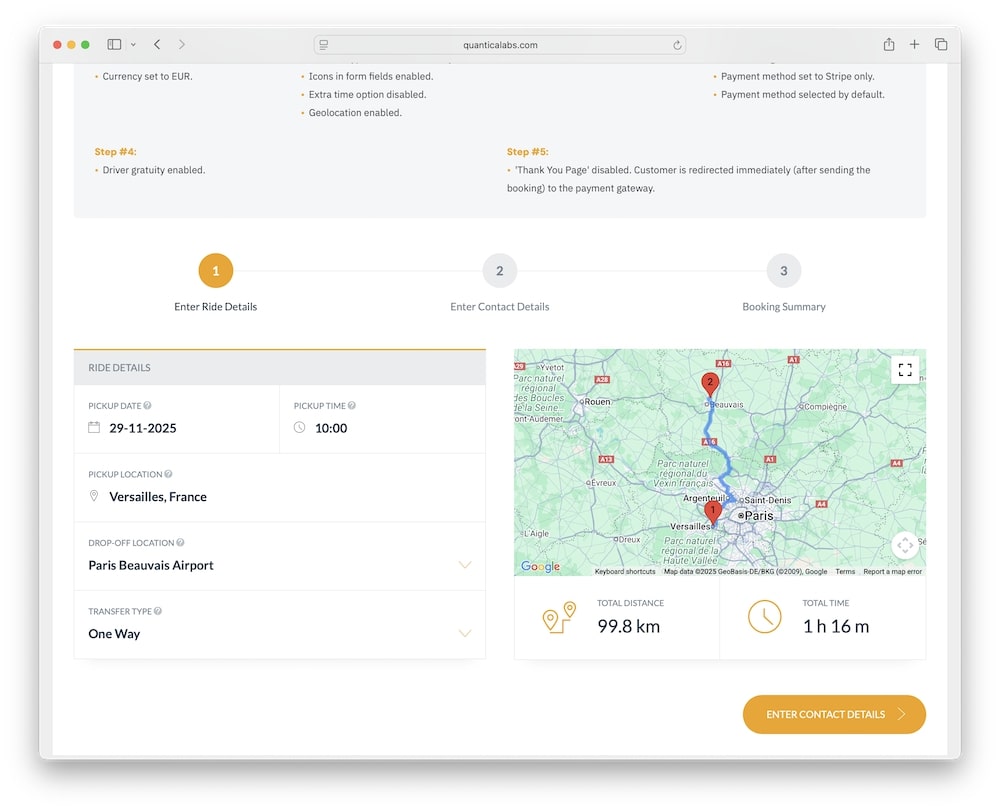
You get a step-by-step booking wizard, live route previews on Google Maps, flexible pricing, and online payments.
Chauffeur is designed for:
- Classic taxi companies
- Luxury limo/chauffeur brands
- Airport transfer & shuttle operators
- Tour, wedding and event transportation services
Instead of gluing 3–4 WP plugins together, Chauffeur gives you one central system to manage:
- Routes and service types (distance, hourly, flat-rate)
- Vehicles, drivers, extras and coupons
- Calendars, availability rules and pricing rules
- Payments (PayPal, Stripe, cash, wire transfer, WooCommerce, etc.)
- And much more!
2. 9 Best Chauffeur Taxi Booking System Plugin Features
1. Smart Route Preview & Live Calculations
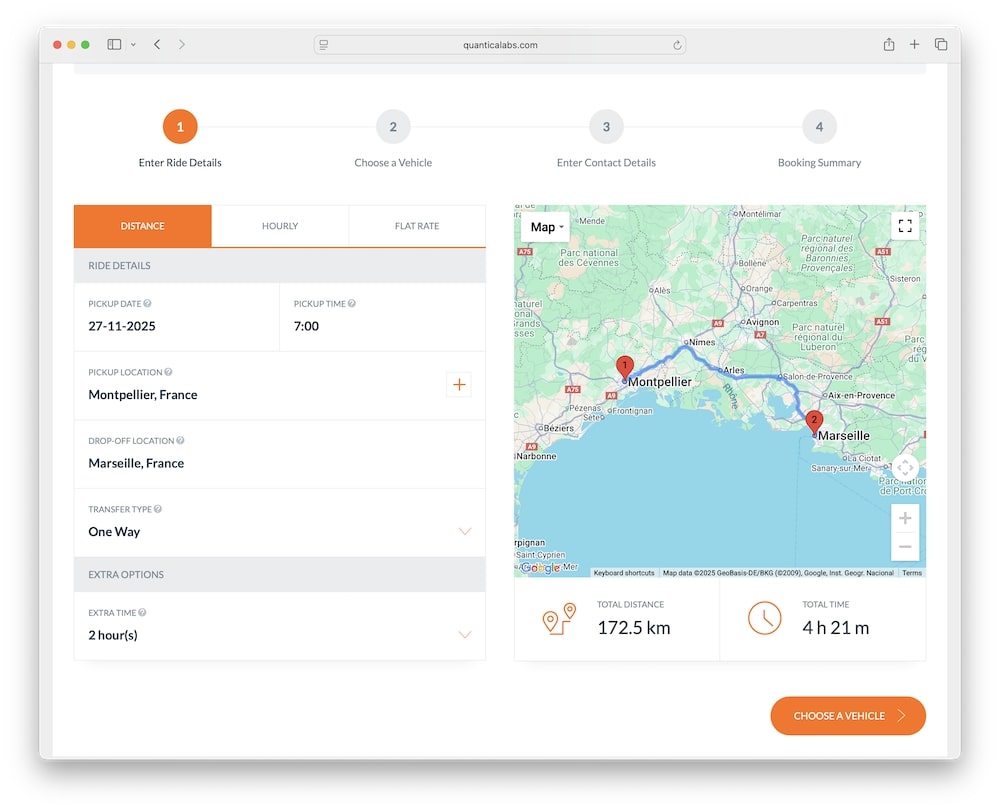
The booking form displays a live Google Map of the full route, with unlimited waypoints.
The plugin calculates total distance, travel time, return trips and extra time automatically, so pricing can stay 100% consistent.
It can even calculate the distance from your base to the pickup point and add a delivery fee on top.
- Live route preview with waypoints
- Distance and duration calculation (including returns)
- Extra time support for waiting or detours
- Delivery fee based on distance from base
2. Three Service Types In One System
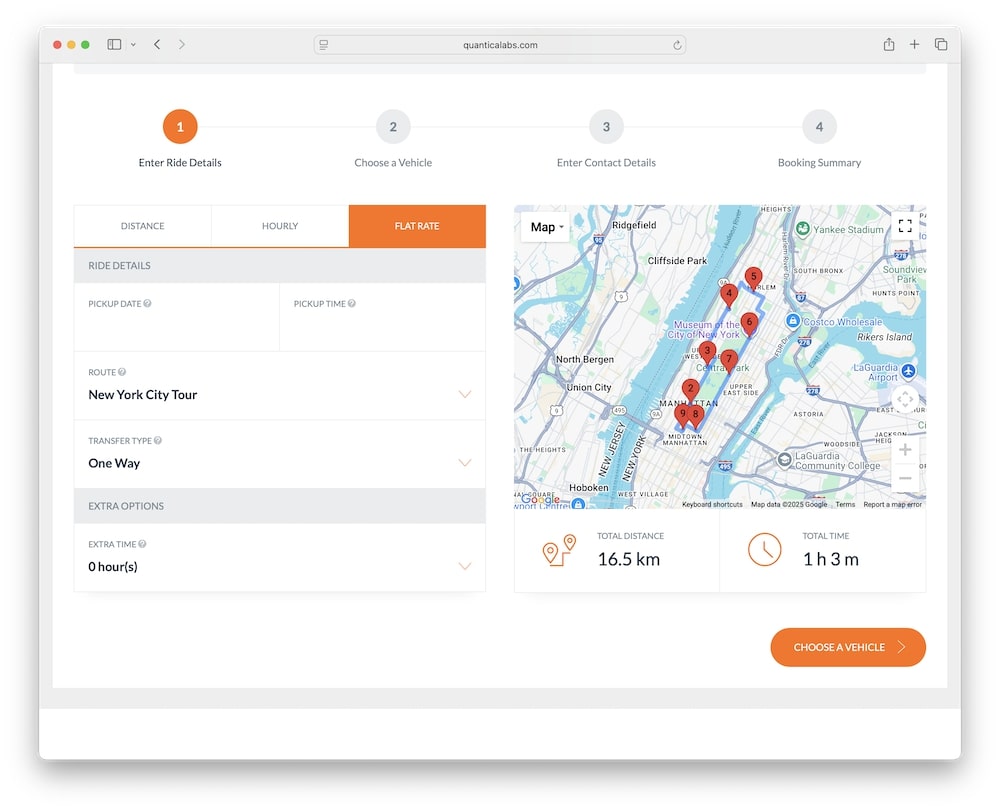
Chauffeur supports three core service models: Distance (point-to-point), Hourly and Flat-Rate.
You can enable all three or only the ones you need for a specific booking form.
Each one has its own pricing logic, which is perfect if you mix airport transfers, hourly limo hire and fixed-price tours in one business.
- Distance service with unlimited waypoints and custom stopovers
- Hourly rentals with pricing tied to duration and passenger count
- Flat-rate predefined routes for tours and shuttles
- Enable/disable service types per booking form
3. Unlimited Booking Forms Tailored To Each Use Case
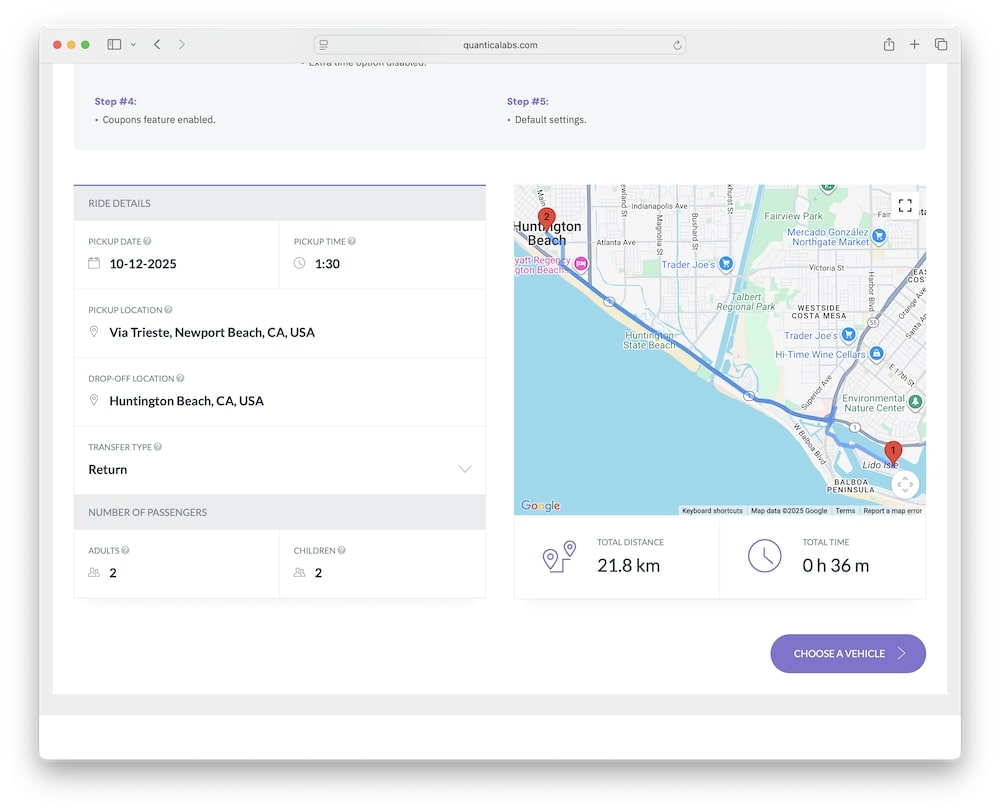
You’re not stuck with one global form.
The plugin lets you create as many booking forms as you want, each with its own services, currencies, pricing methods, payment options, availability, and even design tweaks.
That means you can have one form for weddings, one for airport transfers, another for corporate clients, all with different rules.
EPIC!
- Unlimited forms with separate settings
- Control services, locations, vehicles, extras and currencies per form
- Different default booking statuses and periods
- Optional coupons, reCAPTCHA, WooCommerce, and more
4. Powerful Vehicle & Fleet Management
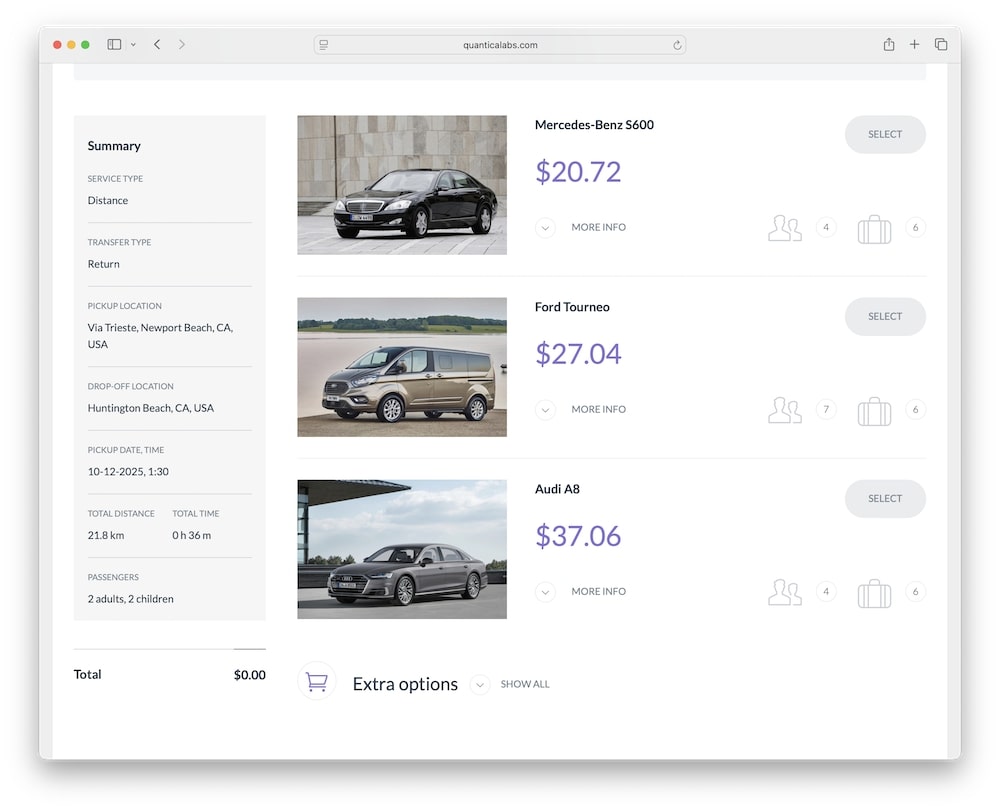
Chauffeur treats your fleet seriously.
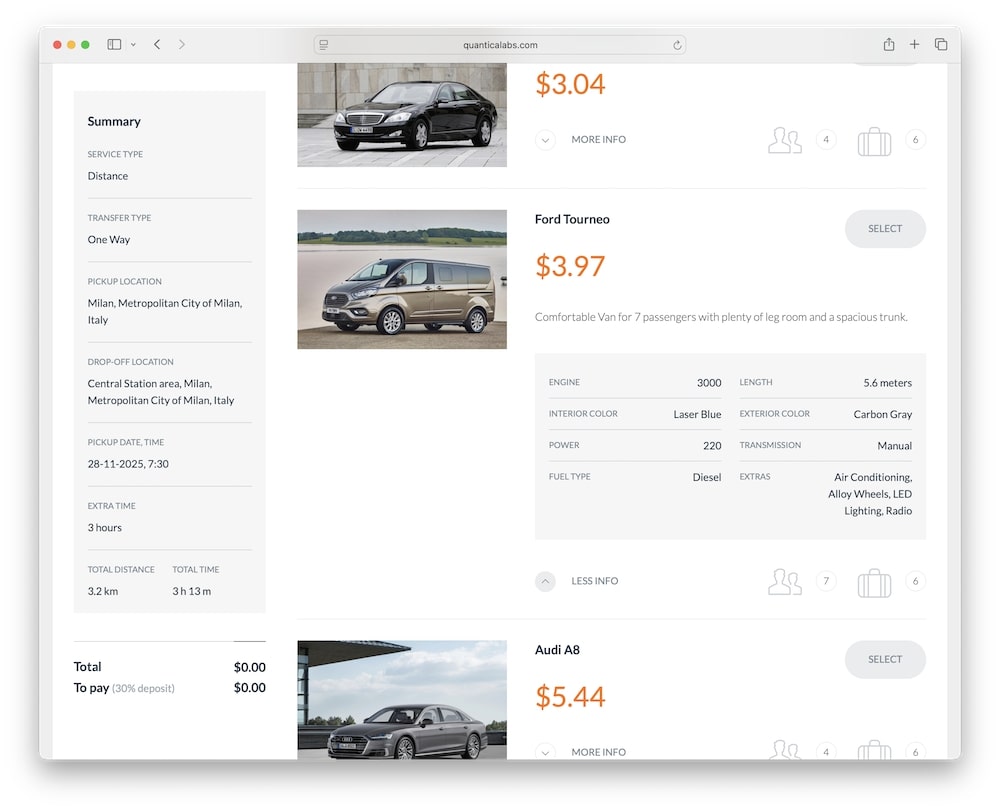
You can define unlimited vehicles and give each one detailed info: make, model, passenger and baggage capacity, standard, base location, company, gallery, tax rates and a huge list of pricing options.
There’s even a system for vehicle attributes (e.g., color, transmission, fuel policy) and vehicle companies.
- Unlimited vehicles with detailed specs
- Vehicle galleries and tax settings
- Attributes like color, engine, transmission, etc.
- Assign vehicles to specific routes, add-ons and pricing rules
5. Booking Extras & Upsells Done Right
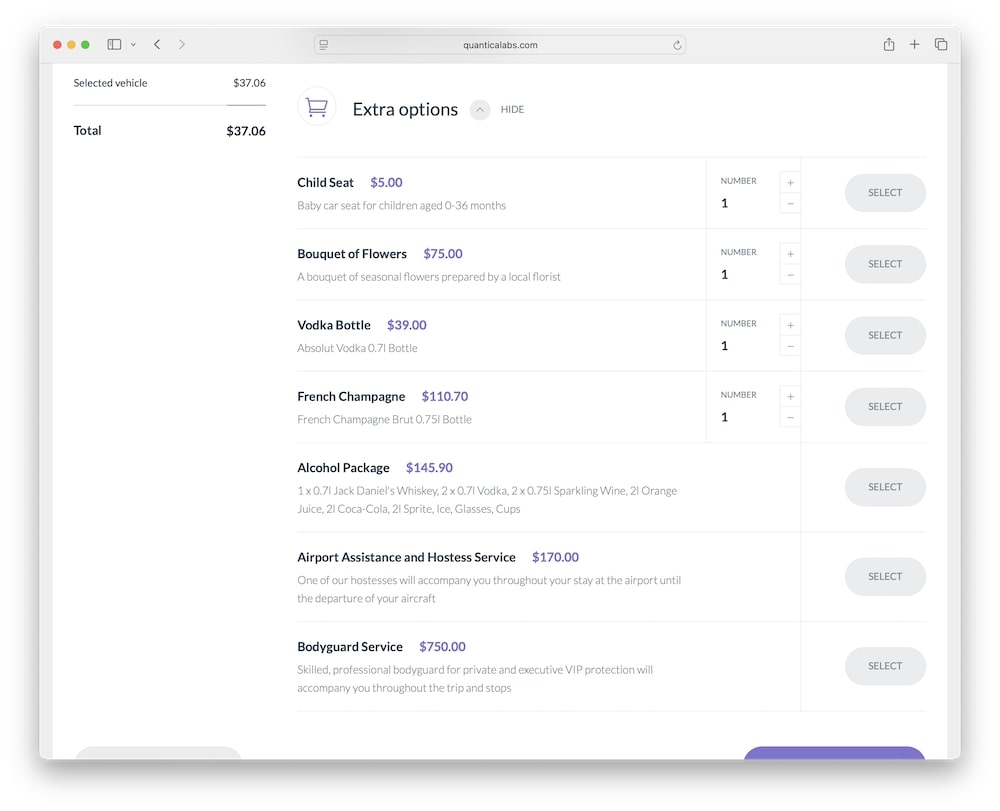
You can create unlimited add-ons like child seats, champagne, meet-and-greet, luggage upgrade or bodyguard service.
Each extra can have its own price, max quantity and availability conditions (which services, vehicles and transfer types it appears on).
This is a really nice way to increase average order value.
- Unlimited add-ons with descriptions and links
- Quantity limits and mandatory/optional flags
- Service/vehicle/transfer-type specific availability
- Custom tax rate per extra
6. Geofence Areas, Driving Zones & Granular Availability
The Geofence module lets you draw custom polygons on a map – airports, cities, specific regions – and use them as conditions in pricing and availability rules.
On top of that, a Driving Zone setting allows you to limit bookings to specific countries or radius distances (e.g. 50 km around Montpellier).
- Draw unlimited geofence areas on Google Maps
- Use geofences in pricing and availability rules
- Limit service to a specific country or radius
- Avoid out-of-area bookings automatically
7. Advanced Pricing & Availability Rules
This is where Chauffeur gets seriously “PRO.”
You can build complex pricing rules based on service type, route, vehicle, distance, time, day of the week, date range, passenger count, geofence area, and more.
The Availability Rules module does the same for when vehicles, extras and payment methods are available.
- Peak/discount pricing by day, time, distance or route
- Different pricing for different vehicles and companies
- Availability rules for vehicles, extras and payment gateways
- No hard limit on number of rules
8. Payments, WooCommerce & Notifications
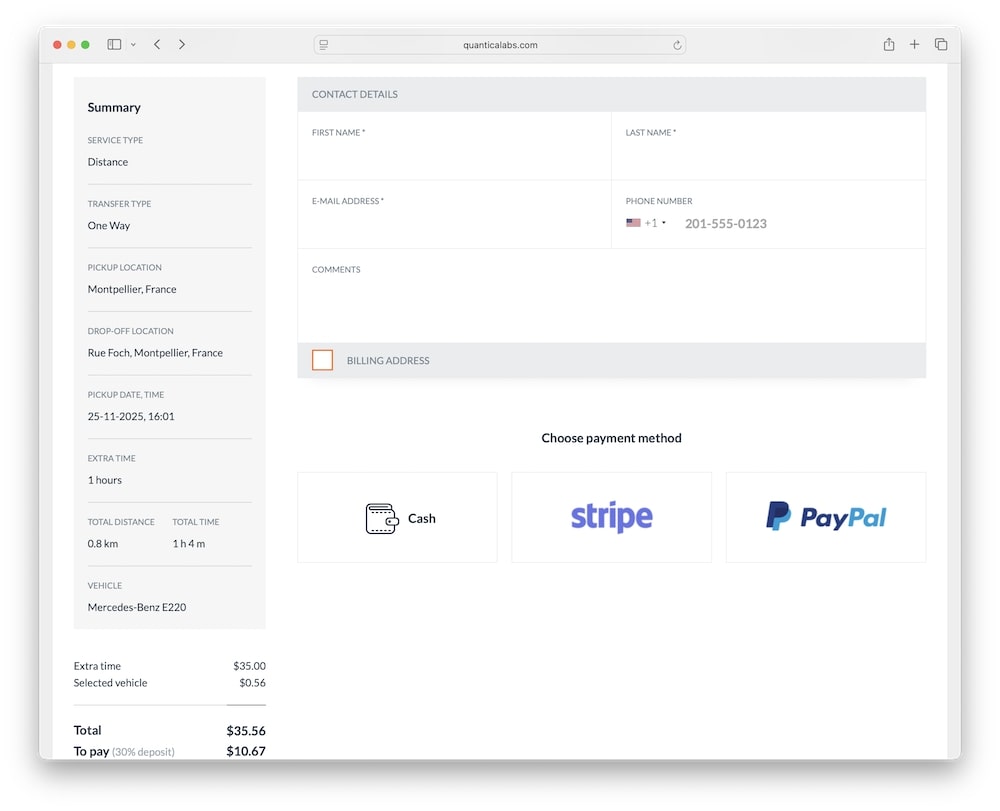
Out of the box, you can accept cash, PayPal, Stripe, wire transfer and card on pickup.
If you connect WooCommerce, you unlock any gateway WooCommerce supports, plus its login/registration and order management.
For notifications, you get email, SMS via Nexmo/Vonage & Twilio, plus Telegram, so both admins and drivers stay in the loop.
- Native PayPal, Stripe, wire, cash and card-on-pickup
- Optional WooCommerce integration
- Deposits support and payment fees (PayPal/Stripe)
- Email, SMS and Telegram notifications for new bookings
9. Calendars, Widgets, Multi-Language & Multi-Currency
Chauffeur ships with a built-in calendar for viewing and managing bookings, plus optional Google Calendar sync for real-time schedule visibility.
It’s fully responsive, includes vertical and horizontal booking widgets, supports WPML, ships translation packs for several languages, and offers multi-currency support with an exchange-rate importer.
- Monthly bookings calendar + Google Calendar integration
- Responsive forms and widgets for sidebars/homepages
- WPML-ready with translation files and language packs
- Multi-currency booking forms with automatic exchange rates
3. My Experience Working With The Chauffeur Taxi Booking System Plugin
When I first opened the Chauffeur dashboard, I had that “whoa, this is serious software” moment.
There are modules for everything: bookings, forms, vehicles, routes, extras, drivers, geofences, pricing rules, availability rules, coupons… the lot.
For a test setup, I built a simple airport transfer + hourly chauffeur site:
- Ran the one-click demo import to get a working booking form, some vehicles and routes
- Tweaked the form to enable only Distance + Hourly services and disabled flat-rate tours
- Added a few vehicles (standard sedan, business sedan, van) with different capacities and pricing
- Set basic pricing rules for night surcharges and weekend rates
The booking wizard itself feels smooth: clear steps, a sticky summary sidebar, and that live map doing its thing while you change waypoints or return options.
On mobile, it’s still very usable, which matters, since many users will book from their phone.
Where things get a bit “power user” is the pricing and availability configuration.
You can go ultra-deep – multiple currencies, coupons, peak hours, geofence-only routes, deposit-based payments.
It’s amazing for a growing company, but a smaller operator might need to invest an afternoon or two to fully understand all the options.
However, for a small business, you won’t need all the features initially. So you learn as you grow – no need to feel overwhelmed with all the stuff right from the get-go.
Overall, though, once the first form is set up, cloning and adjusting for other services is quick.
The built-in calendar and Google Calendar sync are also nice from an everyday-operations standpoint – you can check tomorrow’s rides in WordPress or directly in your Google Calendar.
MORE INFO/DOWNLOAD CHAUFFEUR PLUGIN NOW!4. Real User Feedback
- Anna P.: “We replaced three different tools with Chauffeur. The pricing rules took me a bit to figure out, but now we handle airport transfers, hourly city rides and a few fixed tours from one form. Clients love seeing the route and price update instantly.”
- Luca M.: “For weddings and VIP events, the hourly service type with extras is perfect. I upsell champagne, decorations and extra waiting time right inside the form. The plugin feels solid and I haven’t had any double-bookings so far.”
- Sarah K.: “I’m not super technical, so the backend looked intimidating at first. The demo import helped a lot, and once the initial setup was done, day-to-day booking management is actually easy. SMS notifications are a big win for our drivers.”
- David R.: “We use the flat-rate routes for our city tours. I really like the geofence and route options – prices are consistent and I don’t have to worry about clients entering random locations. Would love an even simpler ‘tour-only’ mode, but overall I’m happy.”
- Maria L.: “The one-time fee was a big reason we went with Chauffeur instead of a SaaS solution. Multi-currency support is super helpful for tourists, and the WooCommerce integration let us hook into our existing payment gateways without hassle.”
5. Chauffeur Taxi Booking System WordPress Plugin Cons
No plugin is perfect, and Chauffeur has a few things you should know before buying:
- Steep learning curve for full power: The backend is very feature-rich. If you only need a simple “contact form + price,” this will feel overkill and you’ll spend time turning things off. (But once your business starts growing, you’ll thank yourself that you pick this plugin.)
- Add-ons cost extra: Some advanced features (like invoices or Google Analytics events) are available as separate paid add-ons, which can add up if you want everything.
Conclusion: Is The Chauffeur Taxi Booking System Plugin Worth It?
If you or your client runs a serious taxi, chauffeur, limo or shuttle business, yes – Chauffeur is absolutely worth considering.
You’re getting:
- A mature plugin with years of updates and a solid user base
- Deep control over pricing, services, vehicles, routes and availability
- Professional features like geofences, advanced rules, multi-currency and multi-language support
Is it overkill for a tiny one-man taxi who just wants a phone number and a WhatsApp button? Honestly, yeah.
But for any company that cares about automation, predictable pricing, fewer phone calls, and clear scheduling, Chauffeur feels more like a mini SaaS platform living inside WordPress than a simple plugin.
For a client project, it also gives you a lot of room to grow:
- Start with one basic booking form
- Later add tours, hourly services, coupons, more vehicles, multi-currency, etc.
- Upgrade with add-ons (invoices, analytics, notifications) when they’re ready
So if you’re building or rebuilding a taxi or chauffeur website on WordPress and want something robust that you can fine-tune to the smallest detail, Chauffeur Booking System is one of the strongest options right now.
MORE INFO/DOWNLOAD CHAUFFEUR PLUGIN NOW!FAQs About Chauffeur Taxi Booking System WP Plugin
Can I use Chauffeur Taxi Booking System for airport transfers and tours at the same time?
Yes. You can enable Distance (point-to-point) services for airport transfers and Flat-Rate routes for tours in the same installation, even on separate booking forms.
Does the plugin work without WooCommerce?
Yes. Chauffeur has its own booking engine and supports cash, PayPal, Stripe, wire transfer and card on pickup out of the box. WooCommerce is optional and only needed if you want to use WooCommerce payment gateways and account features.
Can I limit bookings to my city or service area?
Yes. You can define a Driving Zone (country + radius) and also create geofence areas on the map. This combination lets you block bookings outside your preferred area and apply special pricing inside specific zones like airports or city centers.
Does Chauffeur support multi-language and RTL sites?
It’s compatible with WPML, fully translatable via .po/.mo files, and can work with right-to-left layouts, so you can run it on RTL languages as well.
Can I accept deposits instead of full payment up front?
Yes. In the form’s payment settings, you can enable deposits and set a percentage value of the order total to be paid upfront. The remaining amount can then be collected via your chosen payment method (e.g., cash on pickup).
How hard is it to configure pricing?
Basic pricing (per km, per hour, flat rate) is straightforward once you understand the structure. The advanced Pricing Rules module is very powerful and lets you create complex conditions, but it may take some time and testing to fine-tune everything, especially for businesses with many vehicles and services.
Is Chauffeur Taxi Booking System a good choice for small operators?
For a very small one-car operation, the plugin might be more than you need. But if you plan to grow, add more vehicles, or offer different services (hourly, tours, transfers), starting with Chauffeur gives you a scalable base so you don’t have to migrate later when things get serious.
MORE INFO/DOWNLOAD CHAUFFEUR PLUGIN NOW!If you’re building a dedicated taxi, limo or chauffeur website, check out these: