
The best florist WordPress themes should make buying flowers feel simple, personal, and reassuring from the first click.
Florists sell products tied to important moments.
Birthdays, weddings, anniversaries, apologies, celebrations, and sympathy orders all carry emotion, which means the website has to do more than display attractive arrangements.
Customers need to find the right bouquet quickly, understand delivery options, choose a date, add a message, and trust that the flowers will arrive as expected.

That is why I looked beyond surface-level design when selecting these themes.
I checked how well each one handles product browsing, occasion-based categories, local delivery information, wedding inquiries, galleries, mobile ordering, and WooCommerce customization.
The final list includes options for neighborhood flower shops, online bouquet stores, wedding florists, floral designers, event studios, and businesses that combine flowers with plants, gifts, or subscriptions.
It’s all here for you!
Some themes are stronger for direct sales.
Others are better for custom work and consultation-led services.
Now let’s see which florist WordPress theme fits the way your business actually sells flowers.
This post covers:
- Comparison Table: Florist & Flower Shop WordPress Themes
- Best Florist WordPress Themes
- What A Florist Website Needs To Sell More Flowers
- How To Choose A Florist WordPress Theme
- Conclusion: Get The Right Florist WordPress Theme For Your Business
- FAQs About Florist WordPress Themes
Comparison Table: Florist & Flower Shop WordPress Themes
| Theme | Best For | Builder | Main Strength | My Take |
|---|---|---|---|---|
| Fiore | Online flower shops | Elementor | Polished WooCommerce templates, wishlist, gift cards, Ajax search, & flexible shop editing | Best overall |
| Roisin | Floral studios & wedding florists | Elementor | Strong portfolios, galleries, project pages, & visual storytelling | Best for creative studios |
| Flowers Boutique | Event florists | WPBakery | Balanced product, service, portfolio, & team layouts | Best for events |
| Camelia | Workshops & florist classes | WPBakery | Events, classes, shop features, galleries, & community-focused pages | Best for workshops |
| Flower Shop | Traditional local florists | Custom builder & shortcodes | Products, custom orders, services, galleries, & blog content | Best for local boutiques |
| Indoor Plants | Flowers & houseplants | WPBakery | Plant sales, delivery, rentals, maintenance, & interior landscaping services | Best for botanical stores |
Best Florist WordPress Themes
1. Fiore
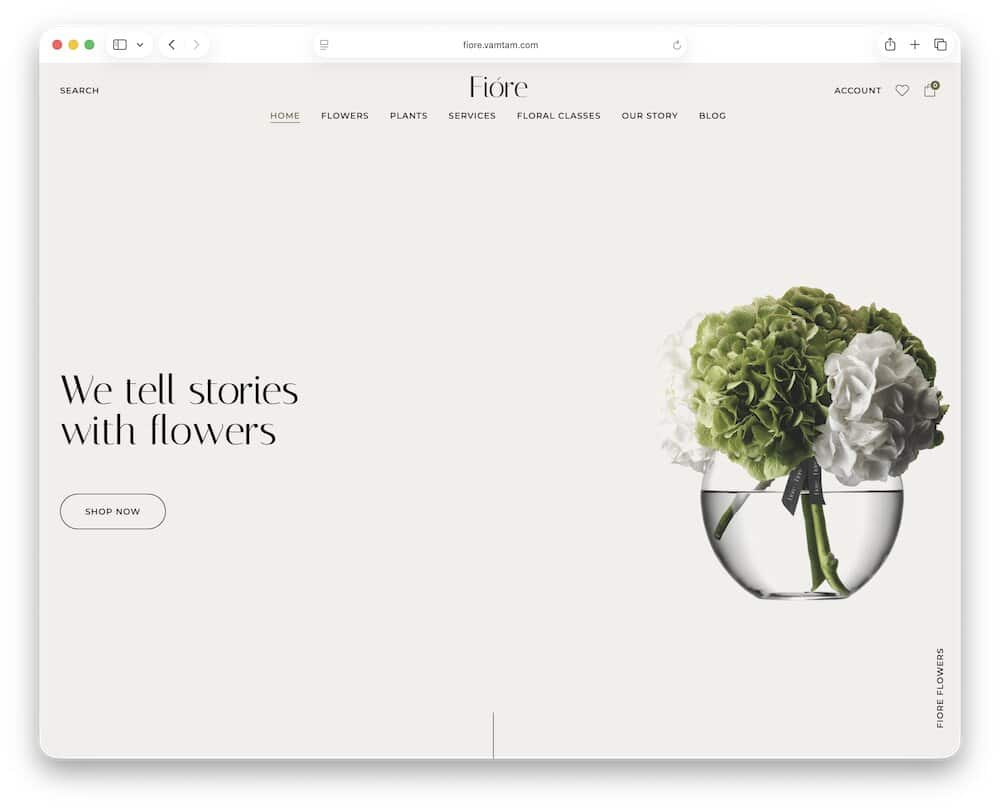
Fiore suits established flower shops that want polished branding without sacrificing practical store features.
Its boutique-style homepage highlights seasonal collections, bestsellers, new arrivals, and individual arrangements without overwhelming the visitor.
WooCommerce product, archive, cart, checkout, account, and side-cart templates are editable through Elementor Pro, while built-in wishlist, AJAX search, and gift-card support improve the shopping experience.
The package also includes mega menus, popups, forms, dynamic blog layouts, and responsive controls for mobile and tablet.
I’d use Fiore for bouquets, occasion-based collections, plants, gift boxes, and premium arrangements, then add a delivery-date or local-pickup plugin for florist-specific fulfillment.
Downside: Elementor Pro is required, which adds an ongoing cost beyond the theme’s $90 price.
But when combined, you can truly take your online presence to the next level.
1.1. Why I Like Fiore Theme
Fiore keeps the shopping journey visually calm.
Customers can browse collections, search products, save favorites, buy gift cards, and move through checkout without the site looking like a generic WooCommerce catalog.
I also like its streamlined setup.
VamTam builds the design around WordPress, Elementor Pro, and WooCommerce rather than requiring a long list of niche plugins.
The included licensed demo images can also help a florist or agency launch a polished first version faster.
1.2. Fiore Is Good For
- Local flower shops
- Premium bouquet stores
- Floral gift businesses
- Florists with seasonal collections
1.3. Fiore WordPress theme features:
- 620+ sales
- 4.5+ star ratings
- Boutique flower-shop and product layouts
- Wishlist, AJAX search, and gift cards
- Price: $90 (may vary)
2. Roisin
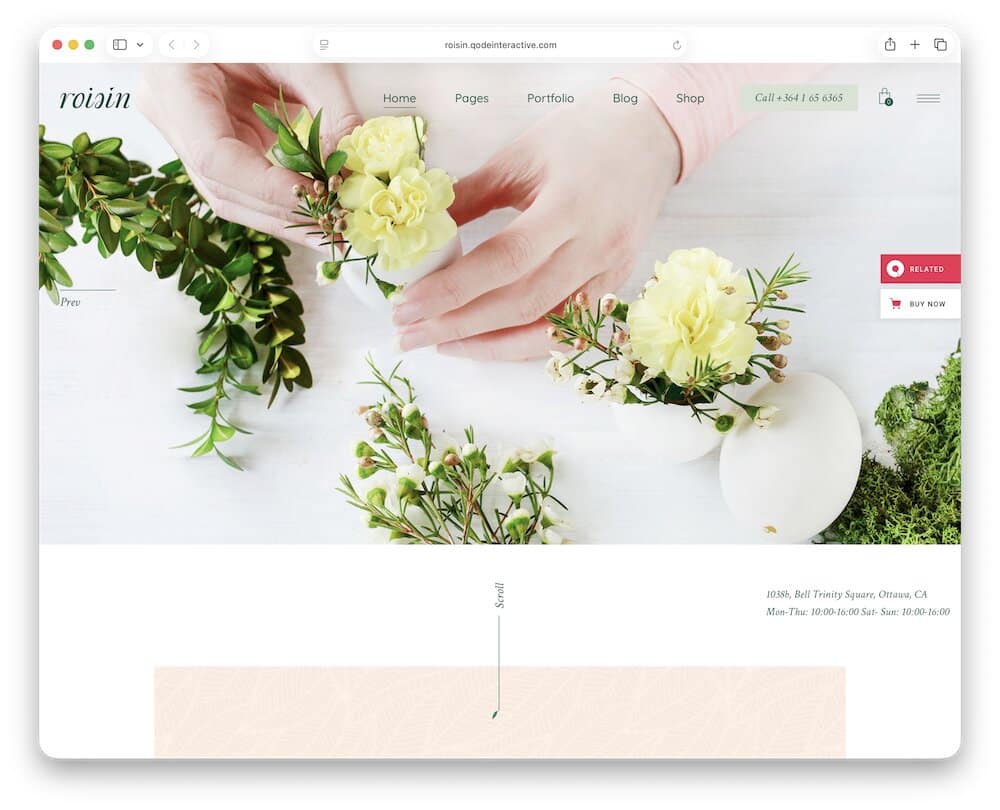
Roisin gives floral designers more room to showcase their work than a typical product-first shop theme.
Its six homepage concepts range from a traditional florist layout to split sliders, carousels, and metro-style showcases.
WooCommerce supports bouquet and plant sales, while the extensive portfolio system can present weddings, installations, event styling, and custom arrangements through galleries, sliders, masonry grids, or individual project pages.
Elementor handles visual editing, and built-in layouts cover working hours, maps, pricing, blogs, product categories, and team content.
You get a ton of stuff to work with, but at the same time, you can create your own pages and layouts without coding.
I’d use Roisin for a design-led studio that sells selected arrangements online but wins larger projects through its portfolio.
Agencies building a broader event business website can also explore these WordPress wedding planner themes.
2.1. Why I Like Roisin Theme
Roisin does not force every florist into a standard online-store structure.
Its portfolio layouts let an agency or studio separate real weddings, venue installations, seasonal work, and bespoke commissions from the everyday product catalog.
The multiple headers and homepage styles also provide more freedom when adapting the theme for different florist clients.
However, I’d simplify the design and rely on strong original photography.
2.2. Roisin Is Good For
- Wedding florists
- Floral design studios
- Event decorators
- Florists combining services and products
2.3. Roisin WordPress theme features:
- 560+ sales
- 4.3+ star ratings
- Six distinct florist homepage concepts
- Extensive portfolio and gallery layouts
- Price: $79 (may vary)
3. Flowers Boutique
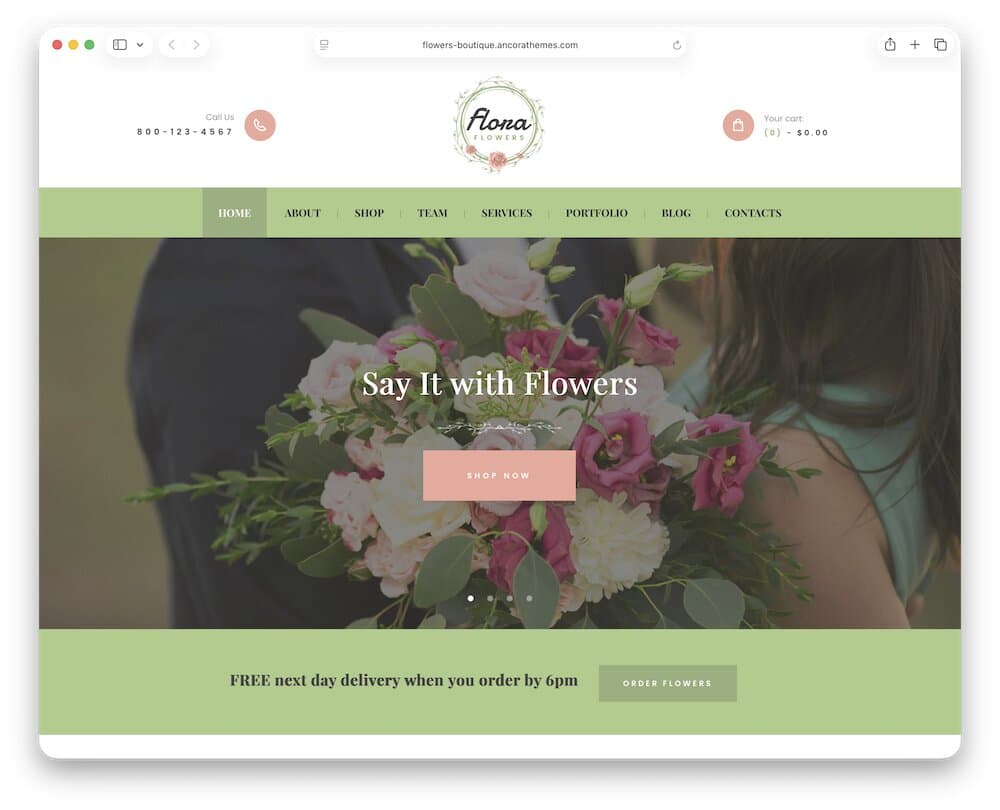
Flowers Boutique works well for florists who sell arrangements online but also decorate weddings, ceremonies, parties, and other events.
The homepage gives equal attention to products and services.
WooCommerce supports bouquets, gifts, plants, and seasonal collections, while the included portfolio, gallery, team, service, and contact layouts can present venue installations and custom floral work.
Moreover, you handle all page editing with WPBakery and use Essential Grid and Slider Revolution for visual showcases.
I’d use the portfolio for real events, then create separate service pages for bridal flowers, venue styling, corporate arrangements, and custom commissions.
3.1. Why I Like Flowers Boutique Theme
Flowers Boutique does not rely entirely on its shop.
It gives event florists enough space to explain services, introduce the team, display previous installations, and collect detailed inquiries.
That balanced structure is useful for businesses where online bouquet orders provide regular income, but weddings and larger events bring higher-value projects.
3.2. Flowers Boutique Is Good For
- Wedding and ceremony florists
- Event decoration businesses
- Traditional flower boutiques
- Florists selling products and services
3.3. Flowers Boutique WordPress theme features:
- 670+ sales
- 4.9+ star ratings
- Service, team, portfolio, and gallery pages
- WPBakery visual page builder
- Price: $69 (may vary)
4. Camelia
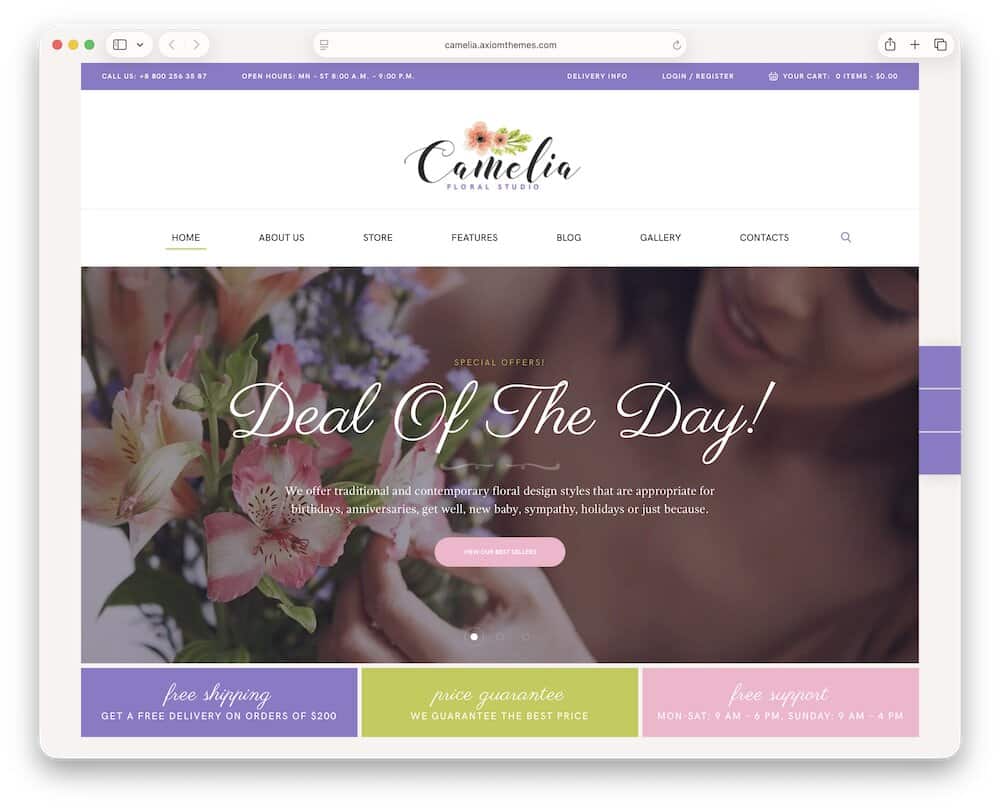
Camelia is a solid choice for flower shops that also run bouquet classes, seasonal workshops, studio events, or private floral sessions.
It includes five homepage variations, two shop styles, service pages, team profiles, galleries, blogs, and event support.
The Events Calendar can promote upcoming workshops, while WooCommerce handles bouquets, plants, gifts, and class-related products.
Customers can filter by category and price, compare items, save favorites, and view related arrangements. Super handy!
WPBakery controls the demo pages, headers, and footers. In other words, you do all the customization tweaks code-free.
Moreover, Essential Grid adds sortable masonry, grid, and cobbles galleries for displaying bouquets or previous workshops.
The styling is elegant but visibly older. I’d simplify the sliders, soften the decorative elements, and use cleaner typography.
4.1. Why I Like Camelia Theme
Camelia gives florists a practical way to connect retail with in-person experiences.
A visitor can browse flowers, meet the team, explore past work, check upcoming workshops, and join the mailing list from one website.
That makes it useful for studios building a local community rather than relying only on bouquet orders.
The five homepage options also give agencies enough flexibility to adapt the same foundation for different florist clients.
4.2. Camelia Is Good For
- Florists offering workshops
- Flower boutiques with regular events
- Floral schools and instructors
- Shops combining products and classes
4.3. Camelia WordPress theme features:
- 300+ sales
- 4.9+ star ratings
- Five florist homepage variations
- WooCommerce wishlist, comparison, and product filters
- Price: $69 (may vary)
5. Flower Shop
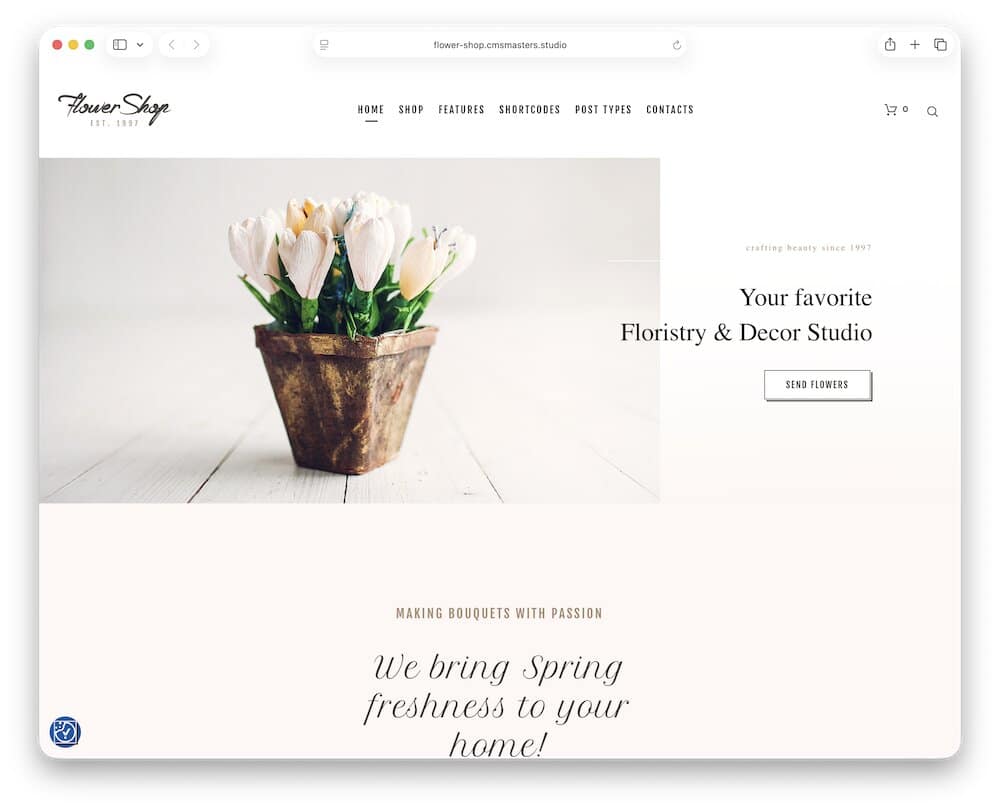
Flower Shop is a practical fit for established local florists that sell ready-made bouquets while also taking custom orders.
Three homepage layouts let you choose between stronger shop, service, or visual storytelling angles.
WooCommerce takes care of bouquets, boxed flowers, seasonal collections, reviews, related products, and customer accounts.
Separate pages for services, galleries, portfolios, team profiles, pricing, and blog content help explain custom arrangements and decoration work beyond the standard catalog.
Pro tip: Introduce your personal touch!
I’d organize the store by flower type and occasion, then use the portfolio for weddings, corporate displays, and previous commissions.
5.1. Why I Like Flower Shop Theme
This theme gives a small florist several useful content formats without turning the site into a complicated eCommerce project.
Products can generate direct sales, while services and portfolios explain custom work that may require a conversation first.
The blog is also more developed than on many florist themes, which gives businesses room to publish care advice, occasion guides, seasonal updates, and local flower-delivery information.
5.2. Flower Shop Is Good For
- Traditional neighborhood florists
- Custom bouquet businesses
- Flower and gift boutiques
- Florists offering decoration services
5.3. Flower Shop WordPress theme features:
- 740+ sales
- 4.5+ star ratings
- Three florist homepage layouts
- WooCommerce bouquet and gift shop
- Price: $59 (may vary)
6. Indoor Plants
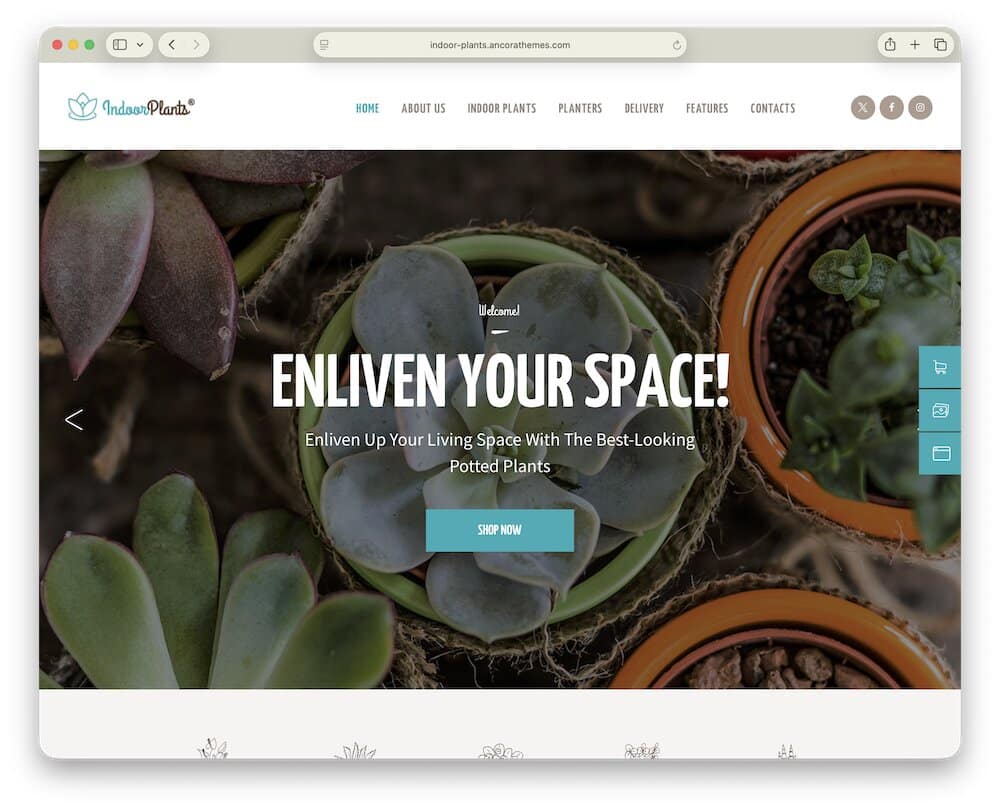
Indoor Plants suits shops that combine bouquets with indoor greenery, decorative planters, plant rentals, and maintenance services.
WooCommerce powers the store, while ready-made pages cover products, delivery, services, galleries, company information, and contact details.
The demo also promotes office plant installations and interior landscaping, giving the theme more service depth than a standard florist shop.
Interactive Ajax search helps customers find products quickly, and Instagram Feed support can display new arrivals or styled interiors.
While you can use the Indoor Plants theme as is, I highly recommend activating the WPBakery page builder to alter and fine-tune it according to your needs.
Finally, I’d use it for plants, pots, dried flowers, botanical gifts, and selected bouquets rather than a florist focused entirely on fresh local delivery.
6.1. Why I Like Indoor Plants Theme
Indoor Plants gives the roundup a useful retail-service combination.
A shop can sell plants and floral gifts while also promoting delivery, maintenance, rental, and interior landscaping.
That opens the door to recurring commercial work with offices, restaurants, hotels, and other businesses.
6.2. Indoor Plants Is Good For
- Florists selling houseplants
- Indoor plant and décor stores
- Office plant suppliers
- Botanical gift shops
6.3. Indoor Plants WordPress theme features:
- 110+ sales
- 4.6+ star ratings
- Delivery, maintenance, rental, and service pages
- Essential Grid and Instagram Feed support
- Price: $69 (may vary)
What A Florist Website Needs To Sell More Flowers
A florist website should make ordering flowers quick, reassuring, and personal.
Customers are often buying for an important moment.
They need to find the right arrangement, understand delivery options, add their message, and complete the order without confusion.
These are the elements I’d prioritize.
1. Shop By Occasion
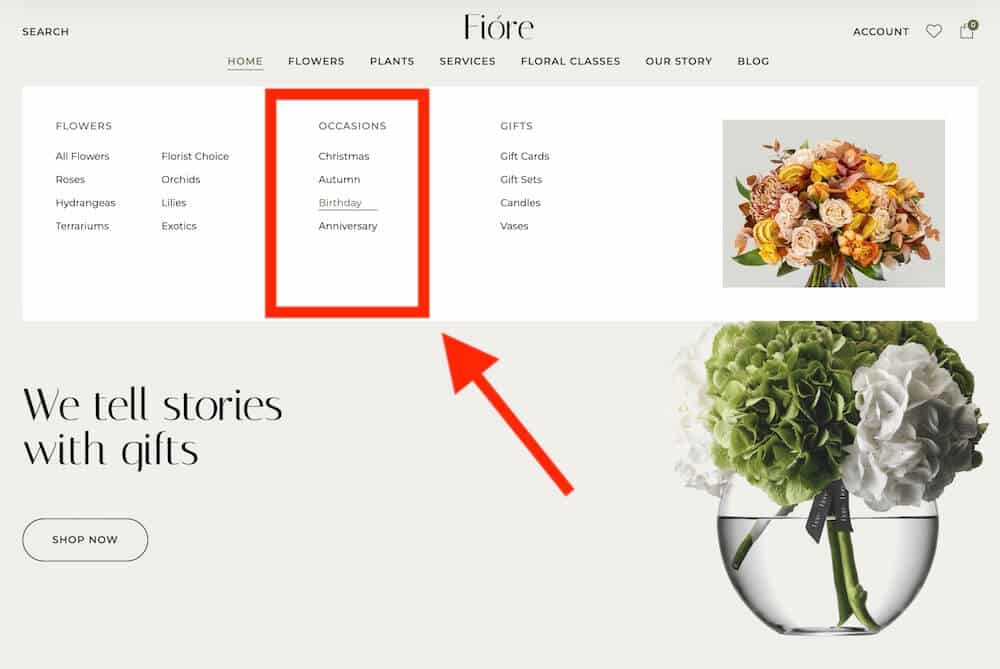
Many customers know why they need flowers before they know which bouquet to choose.
Create clear categories for:
- Birthdays
- Anniversaries
- Weddings
- Sympathy
- Romance
- Thank you
- Congratulations
- Get well
- Seasonal holidays
Occasion-based navigation reduces browsing time and helps customers make a decision faster.
2. Delivery Information
Do not make visitors search through several pages to understand delivery.
Show:
- Areas you cover
- Delivery fees
- Same-day cut-off times
- Available delivery days
- Estimated time windows
- Local pickup options
- Holiday delivery rules
One of these WooCommerce shipping plugins can help you manage delivery dates, local rates, restricted areas, order tracking, and other fulfilment details.
3. Delivery Date Selection
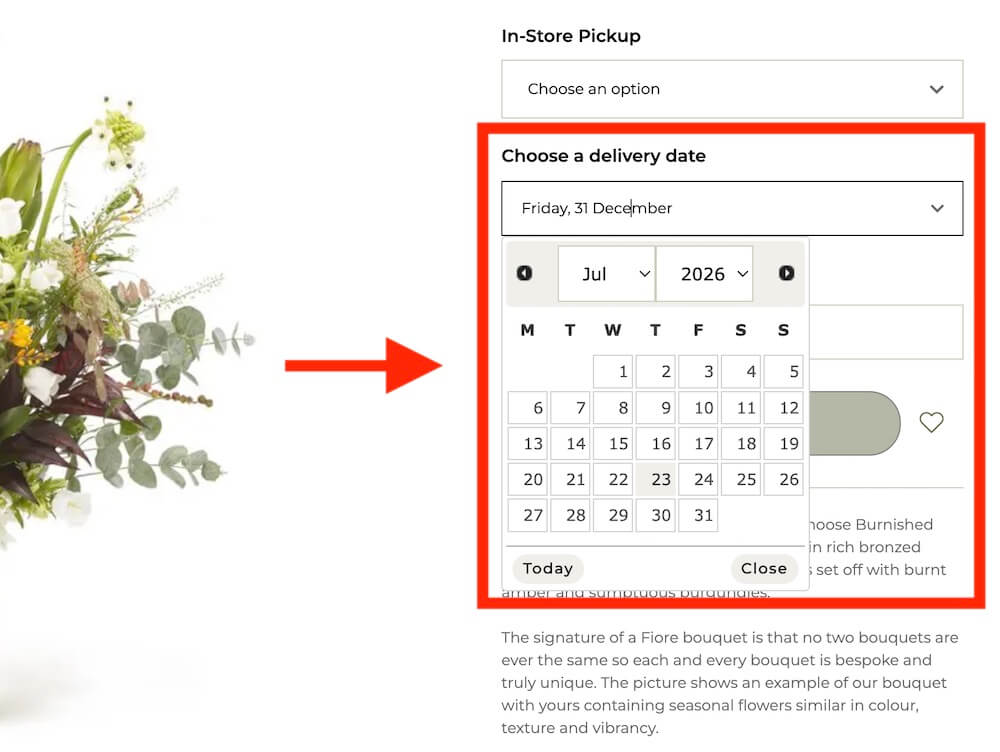
Customers should be able to choose their preferred delivery or collection date before paying.
A calendar can prevent orders from arriving too early, too late, or on a day when the shop is closed.
Disable unavailable dates and make busy holiday periods clear in advance.
4. Personal Message Fields
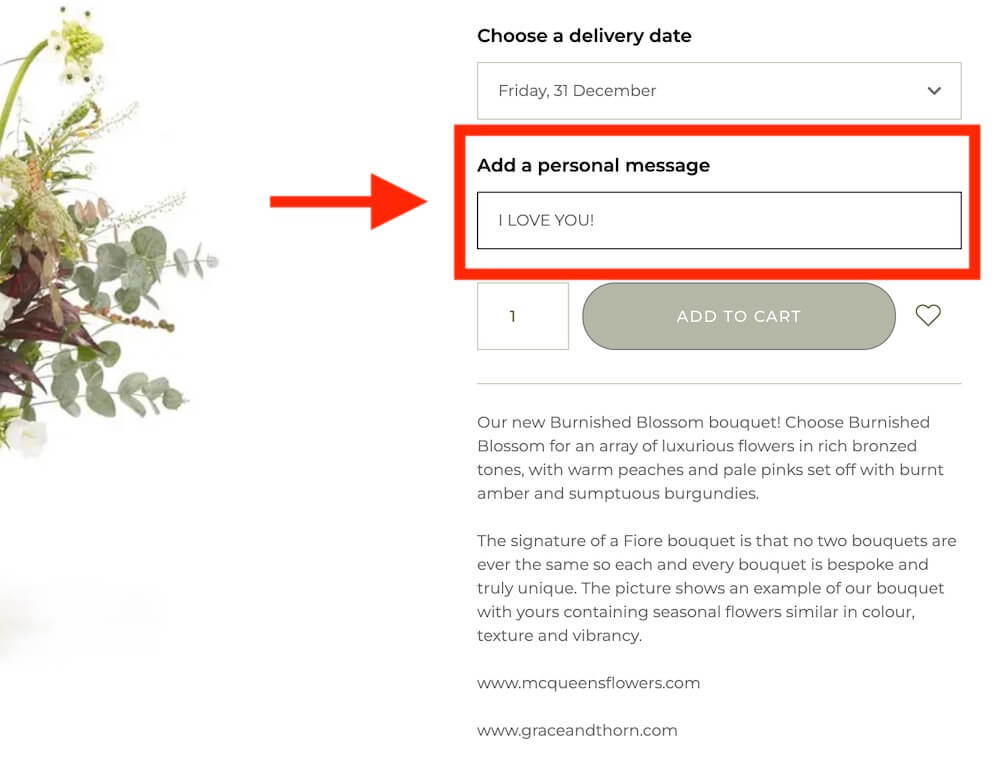
Let customers add a card message directly from the product page or cart.
Keep the field easy to find.
You may also want to display a character limit so customers know how much space is available.
5. Useful Product Add-Ons
Relevant extras can increase order value while making the gift more complete.
Popular add-ons include:
- Chocolates
- Vases
- Candles
- Balloons
- Greeting cards
- Soft toys
- Wine or gift items where permitted
Pro tip: Do not add too many add-ons because they can cause distraction.
Businesses that sell more gifts than fresh arrangements may also prefer one of these WordPress gift shop themes.
6. Bouquet Sizes And Variations
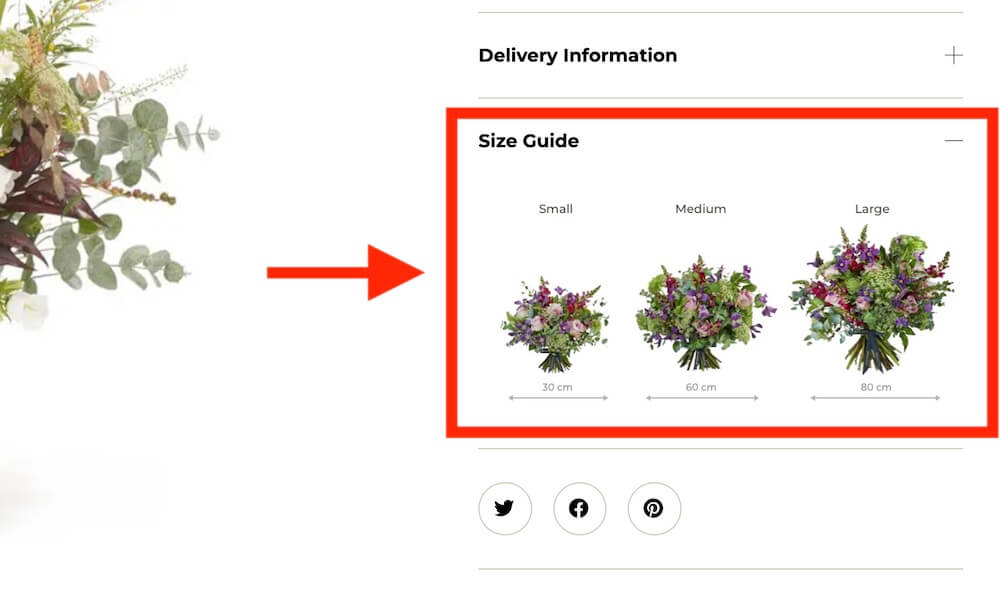
Give customers a clear choice between sizes such as standard, deluxe, and premium.
Use images or practical descriptions to explain the difference. Customers should understand what changes between each price level.
You can also offer variations by color, flower type, container, or arrangement style.
7. Honest Substitution Information
Fresh flower availability changes with the season and local supply.
Explain whether substitutions may be necessary and how you handle them.
Reassure customers that replacements will match the original style, color palette, and value as closely as possible.
Clear expectations reduce complaints later.
8. Strong Product Photography
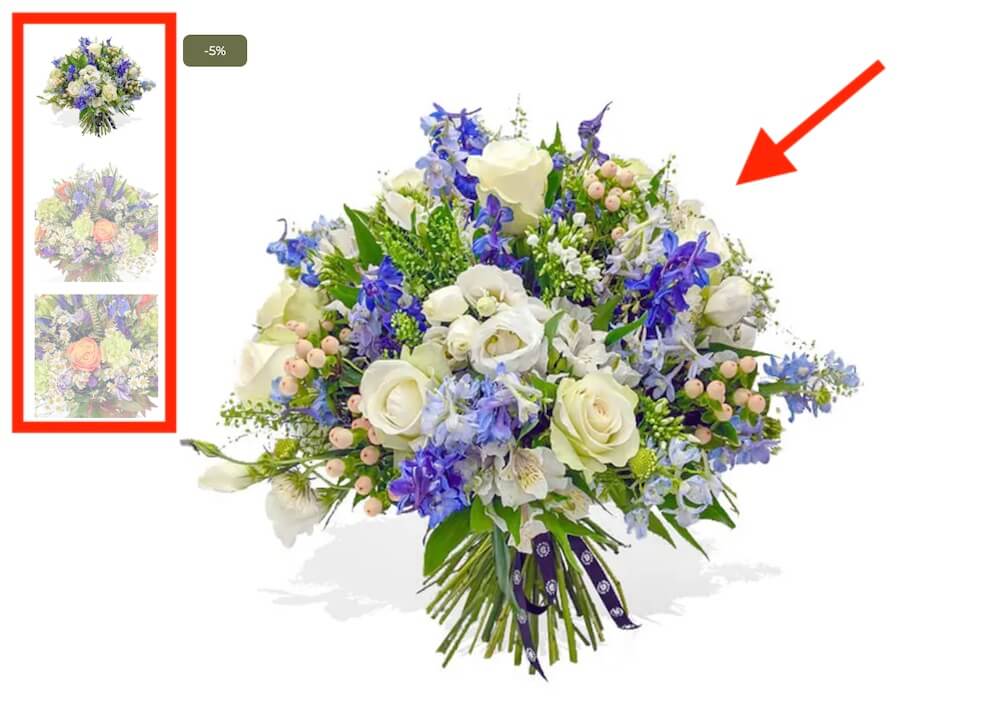
Flowers are highly visual, so photography has a direct impact on sales.
Use:
- Several product angles
- Close-up detail shots
- Images showing scale
- Clean backgrounds
- Consistent lighting
- Real examples of different bouquet sizes
Avoid using generic stock images.
9. Simple Product Descriptions
Explain what the arrangement includes without adding unnecessary filler.
Mention:
- Main flowers
- Color palette
- Bouquet style
- Container or wrapping
- Available sizes
- Best occasions
- Care instructions
- Possible substitutions
10. Visible Same-Day Availability
Same-day delivery can be a strong selling point for local florists.
Display the deadline clearly near the product title, price, or add-to-cart button.
Also explain whether same-day service is available across every delivery area.
Do not promote it when the cut-off time has already passed.
11. Fast Mobile Ordering
Many flower orders are placed quickly from a phone.
Test the entire process:
- Occasion menus
- Product filters
- Image galleries
- Date selectors
- Message fields
- Add-ons
- Cart
- Checkout
- Payment
Buttons and fields should remain easy to tap.
12. Short Checkout
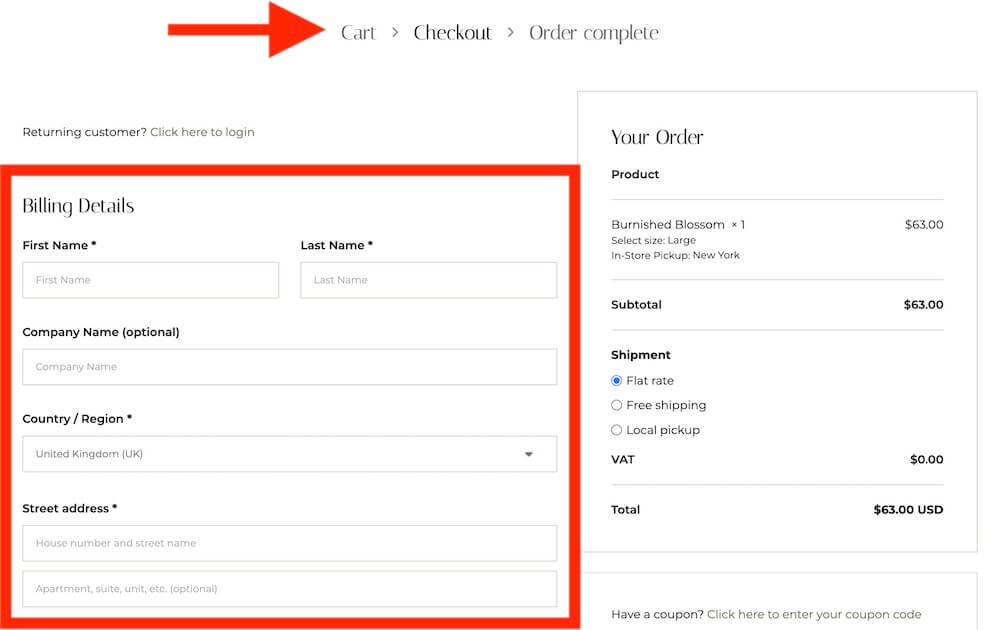
Remove unnecessary steps.
Allow guest checkout and request only the information needed to process the order, including the buyer’s details, recipient information, delivery address, date, and message.
Make it obvious when billing and recipient addresses are different.
13. Wedding And Event Inquiries
Large floral projects usually need a separate inquiry process.
Create dedicated pages for:
- Weddings
- Corporate events
- Private parties
- Venue decoration
- Funeral flowers
- Floral installations
The inquiry form can ask for the event date, location, budget, guest count, required arrangements, and preferred style.
14. Real Wedding And Event Galleries
Show completed work rather than relying only on product photos.
Organize galleries by event type, venue, style, or season. Include wide venue images, table arrangements, bridal bouquets, installations, and close-up details.
Real projects help potential clients judge your experience and style.
A flexible WordPress gallery plugin can help you create responsive grids, albums, lightboxes, and visual collections without rebuilding the theme.
15. Reviews And Local Trust
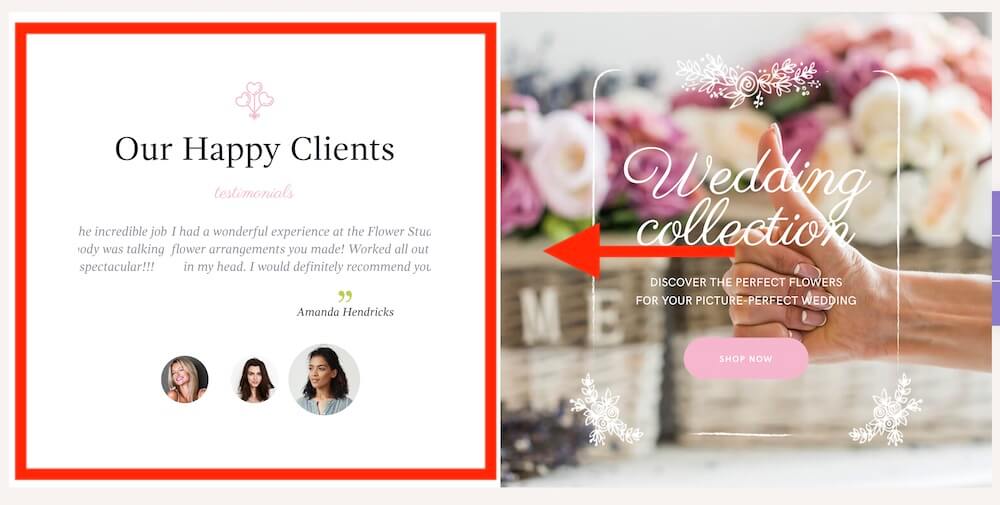
Display feedback from customers who ordered deliveries, wedding flowers, or custom arrangements.
Also include:
- Physical shop address
- Opening hours
- Phone number
- Delivery coverage
- Google Maps location (use a WordPress map plugin if needed)
- Team or studio photos
- Years in business
- Local awards or partnerships
These details reassure customers that a real florist will handle the order.
A WordPress testimonial plugin can help you collect and display feedback from delivery customers, wedding couples, event clients, and local shoppers.
16. Seasonal Promotions
Florists depend heavily on occasions such as Valentine’s Day, Mother’s Day, Christmas, and wedding season.
Prepare landing pages early and highlight:
- Ordering deadlines
- Limited collections
- Delivery availability
- Popular arrangements
- Gift bundles
- Preorder options
17. Helpful Care Advice
Simple care instructions can improve the customer experience after delivery.
Add guidance for:
- Trimming stems
- Changing water
- Flower food
- Room temperature
- Sunlight
- Pet safety
- Expected vase life
How To Choose A Florist WordPress Theme
- Match it to your business: A local flower shop needs stronger delivery and shop features, while a wedding florist may prioritize galleries and inquiry forms.
- Check WooCommerce support: Make sure product pages, cart, checkout, customer accounts, and product variations are properly designed.
- Review product categories: The theme should make it easy to organize flowers by occasion, type, price, color, or recipient.
- Look at delivery flexibility: Confirm that the theme works smoothly with plugins for delivery dates, local zones, pickup times, and same-day cutoffs.
- Check product add-ons: Florists may need card messages, bouquet sizes, vases, chocolates, balloons, and other extras.
- Test the mobile shop: Browse products, choose variations, select a date, add a message, and complete checkout from a phone.
- Review gallery options: Wedding and event florists need strong portfolios for bouquets, venue installations, table flowers, and previous commissions.
- Check form flexibility: Consultation and custom-order forms may need fields for dates, venues, budgets, styles, and delivery details.
- Choose a builder you know: Elementor is usually easier for visual editing, while older themes may rely on WPBakery.
- Review seasonal promotion layouts: Florists need landing pages and banners for Valentine’s Day, Mother’s Day, Christmas, weddings, and other busy periods.
- Check update history: Choose a theme that receives regular WordPress, WooCommerce, plugin, compatibility, and security updates.
- Avoid choosing on looks alone: Elegant typography and floral imagery matter, but ordering, delivery, mobile checkout, and store navigation matter more.
- Consider agency reuse: Agencies should look for flexible headers, editable shop templates, several demos, multilingual support, and reliable documentation.
- Pick the closest starting point: The less you need to rebuild, the faster you can launch a polished and practical florist website.
Conclusion: Get The Right Florist WordPress Theme For Your Business
The right florist WordPress theme should match how your business earns money.
Choose Fiore if you want the strongest overall package for a polished flower shop with serious WooCommerce functionality.
Roisin is better for design-led floral studios that rely on portfolios, custom projects, weddings, and event inquiries alongside product sales.
Go with Flowers Boutique if your business combines traditional bouquet orders with wedding decoration and larger event services.
Camelia stands out for florists offering workshops, classes, studio events, and community experiences.
Choose Flower Shop for a more traditional local boutique that needs products, custom orders, service pages, galleries, and useful blog layouts.
Meanwhile, Indoor Plants is the strongest option for businesses selling houseplants, pots, botanical gifts, and plant-care services alongside flowers.
I’d start with the theme that already supports your main customer journey.
A florist focused on local delivery needs a capable shop, while a wedding designer needs stronger galleries and inquiry forms.
Design matters.
But clear ordering, delivery information, strong photography, and an easy mobile experience will have a much bigger impact on whether visitors become customers.
FAQs About Florist WordPress Themes
What is the best florist WordPress theme?
Fiore is my top overall pick. It combines polished flower-shop design with flexible WooCommerce templates, wishlists, gift cards, AJAX search, and Elementor Pro customization.
Which florist theme is best for wedding florists?
Roisin is a strong choice for wedding florists and floral studios. Its portfolio layouts work well for real weddings, venue decorations, installations, and custom projects.
Which theme is best for florist workshops?
Camelia is the best fit for florists offering bouquet classes, seasonal workshops, private sessions, and other studio events.
Can I sell flowers online with WordPress?
Yes. WordPress and WooCommerce can manage bouquets, plants, gifts, product variations, payments, customer accounts, and online orders.
Can customers choose a flower delivery date?
Yes, but you will usually need a WooCommerce delivery-date plugin. It can add calendars, unavailable dates, pickup times, delivery zones, and same-day cutoffs.
Can customers add a personal card message?
Yes. You can add a message field to the product page, cart, or checkout through a product add-on or checkout-field plugin.
Can I offer different bouquet sizes?
Yes. WooCommerce variable products can offer standard, deluxe, and premium sizes with separate prices, descriptions, and images.
Can I sell flowers with chocolates, vases, and other gifts?
Yes. Product add-ons can let customers include chocolates, cards, candles, vases, balloons, or other suitable gifts with their flower order.
Can I offer local pickup and flower delivery?
Yes. WooCommerce supports local pickup and shipping methods. Extra plugins can manage delivery areas, postcode restrictions, fees, dates, and time slots.
Which theme is best for flowers and houseplants?
Indoor Plants is the strongest option for businesses selling houseplants, pots, botanical gifts, and plant-care services alongside flowers.
Can I create a florist website without an online store?
Yes. Wedding florists, floral designers, and event studios can focus on portfolios, service pages, consultation forms, and custom inquiries instead.
Do florist WordPress themes support Elementor?
Fiore and Roisin support Elementor, although Fiore requires Elementor Pro. Several older themes in this roundup use WPBakery instead.
Are florist WordPress themes mobile-friendly?
Yes, but test every demo yourself. Pay close attention to product browsing, delivery calendars, message fields, add-ons, cart pages, and checkout forms.
Can I use these themes for a flower subscription business?
Yes. WooCommerce subscription plugins can support weekly, monthly, or seasonal flower plans, although subscription functionality is not built into most themes.