


Running auctions on WordPress can get surprisingly complex.
You need bidding rules, reserve prices, auction timers, winner handling, payments, and sometimes even anti-sniping or proxy bidding.
And if WooCommerce is involved, the setup gets even more interesting.
The good news?

You don’t need to build all of that from scratch.
The right WordPress auction plugin can turn a normal store into a proper bidding platform, whether you want to sell a few high-value items, run regular auctions, list products on eBay, or build something more advanced.
Some WP plugins keep things simple.
Others support multiple auction types, automatic bidding, Buy Now options, fees, and deeper WooCommerce controls.
So I narrowed this list down to my favorite auction plugins that each bring something different to the table.
Less filler.
More useful picks.
This post covers:
- Quick Picks
- Best WordPress Auction & Bidding Plugins
- Do You Need WooCommerce For Online Auctions?
- Normal Vs Reverse Vs Sealed Vs Proxy Auctions
- What Is Anti-Sniping?
- Should You Use Buy Now Alongside Bidding?
- How Do Auction Winners Pay?
- Conclusion: Which WordPress Auction Plugin Should You Choose?
- FAQs About WordPress Auction Plugins
Quick Picks
Here are my top WordPress auction plugin picks:
- WooCommerce Simple Auctions — Best Overall: A strong all-rounder with regular, reverse, sealed, and proxy auctions.
- YITH WooCommerce Auctions — Best Premium Alternative: Great for polished WooCommerce auctions with advanced bidding controls.
- Auctions Made Easy for WooCommerce — Best For Beginners: A simpler option for straightforward auction setups.
- WP-Lister Lite for eBay — Best For WooCommerce + eBay: Best if you want to connect WooCommerce products with eBay listings.
- Auction Engine — Best For Multiple Auction Types: A flexible choice with several auction formats, bidding fees, anti-sniping, and more.
For most sites, I’d start with WooCommerce Simple Auctions.
If you want something more polished and premium-focused, YITH WooCommerce Auctions is the first alternative I’d check.
Best WordPress Auction & Bidding Plugins
New to premium WordPress plugins? Here’s how to install a WordPress plugin correctly.
1. WooCommerce Simple Auctions (Our FAV!)

WooCommerce Simple Auctions is the plugin I’d start with for most auction sites.
It turns WooCommerce products into proper auctions and supports regular, reverse, sealed, and proxy bidding.
You can also set reserve prices, bid increments, Buy Now prices, start/end times, and anti-sniping rules that extend the auction when someone bids right at the end.
I like how well it handles the smaller details.
Bidders can get outbid and winner notifications, follow auctions from a watchlist, view auction history, and see live bid updates without refreshing the page.
You can even auto-charge winners through Stripe if their card is stored.
Another big plus is flexibility.
It works with WooCommerce payment gateways, supports Elementor, and can be extended into a multi-vendor auction marketplace with Dokan or WooCommerce Product Vendors.
It’s also been actively developed for more than a decade, which matters for something as transaction-heavy as auctions.
- Best for: Most WooCommerce auction websites
- Includes: Regular, reverse, sealed, and proxy auctions, reserve prices, Buy Now, anti-sniping, AJAX bidding, watchlists, notifications, reports, and more
- Why we like it: Strong feature set without forcing you into a completely separate auction platform
- What I’d improve: Some more advanced setups, like multi-vendor auctions or extra payment verification, require additional integrations or add-ons
- Price: $99
Want a deeper look before buying? Read my full WooCommerce Simple Auctions review for setup details, real-world testing, pros, cons, and more.
GET YOUR SIMPLE AUCTIONS PLUGIN NOW!2. Auctions for WooCommerce

YITH Auctions for WooCommerce is a polished option for stores that want more control over the bidding experience.
You can run standard, reverse, and sealed auctions, set reserve and Buy Now prices, charge bidding fees, and use automatic bidding so users can enter the maximum amount they’re willing to spend.
There’s also a strong focus on reducing unpaid wins.
You can require a valid credit card before bidding, automatically create a pending-payment order when the auction ends, or even charge the winner automatically when using YITH Stripe.
I also like the built-in watchlists, bidder notifications, auction rescheduling, AJAX bid updates, and anti-sniping controls.
And if you already use YITH Multi Vendor, sellers can run their own auctions too.
- Best for: WooCommerce stores that want a polished premium auction setup
- Includes: Standard, reverse, and sealed auctions, automatic bidding, reserve prices, Buy Now, fees, watchlists, notifications, anti-sniping, and auction rescheduling
- Why we like it: Strong bidder controls and useful tools for reducing unpaid auctions
- What I’d improve: Some of the best extras, including automatic card charging and multi-vendor auctions, require additional YITH plugins
- Price: $149.99/year
Note: If multiple sellers will run their own auctions, compare the best WooCommerce multi-vendor plugins before building the marketplace side.
3. Auctions Made Easy for WooCommerce

Auctions Made Easy is a good fit if you want plenty of auction control without making the setup unnecessarily complicated.
It supports normal, reverse, sealed, proxy, and unique auctions, plus reserve prices, Buy Now, bid increments, watchlists, and automatic winner selection.
You can also charge users to register for an auction or place bids, which is useful if you want to monetize participation itself.
There are separate dashboards for admins and bidders, along with email and browser push notifications for outbids, auction endings, and wins.
Winner handling is strong too.
You can set payment deadlines, require saved card details before bidding, automatically charge winners, or move to the second-highest bidder if the first winner doesn’t pay.
- Best for: Users who want a feature-rich WooCommerce auction setup without going too technical
- Includes: Five auction types, reserve prices, Buy Now, bid fees, registration fees, watchlists, notifications, auto-relisting, and winner payment controls
- Why we like it: Lots of useful auction tools are included in one plugin
- What I’d improve: The sheer number of settings may still take some time to learn
- Price: $99/year
4. WP-Lister Lite for eBay

WP-Lister Lite is different from the other plugins here.
It doesn’t turn your WordPress site into an auction platform.
Instead, it connects your WooCommerce store to eBay, so you can push products to eBay directly from WordPress and manage listings from one place.
You can create listing profiles, choose eBay categories, handle variations, set shipping options, preview listing fees, and reuse templates across multiple products.
That makes it especially useful if eBay is already a major part of your sales strategy.
- Best for: WooCommerce stores that also sell through eBay
- Free version includes: Product listing, profiles, categories, variations, shipping options, fee previews, and listing templates
- Why we like it: Saves time by managing WooCommerce-to-eBay listings from WordPress
- What I’d improve: It’s an eBay integration tool, not a native WordPress auction system
5. Auction Engine for WooCommerce
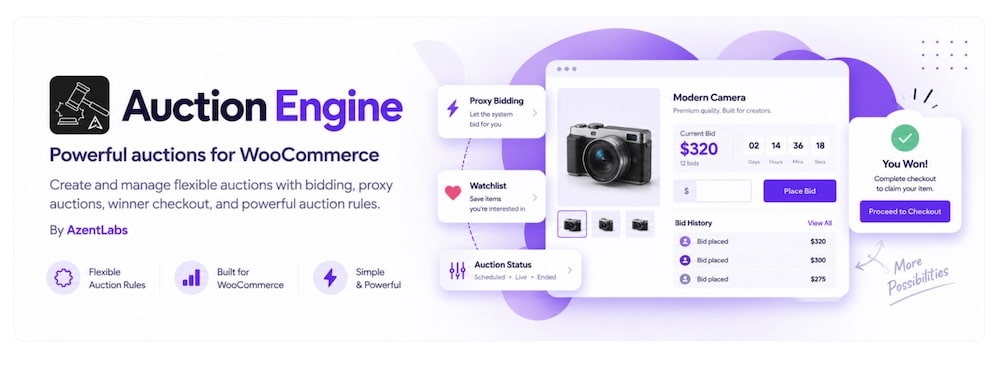
Auction Engine stands out because it supports six different auction formats in one WooCommerce setup.
You can run normal, reverse, sealed, proxy, unique, and reverse-unique auctions.
That makes it useful for everything from collectibles and high-demand products to supplier bidding and procurement.
It also gives you plenty of control over the auction rules.
Set reserve prices, Buy Now options, bid increments, registration fees, bid fees, buyer premiums, payment deadlines, and anti-sniping extensions for late bids.
Winners pay through the normal WooCommerce checkout, while watchlists, bid history, reminders, and auction dashboards keep customers in the loop.
I also like the winner-handling tools. If someone doesn’t pay, you can promote the next eligible bidder or automatically relist the auction.
The main drawback?
It’s still very new.
So while the feature list is impressive, it doesn’t yet have the long track record of WooCommerce Simple Auctions or YITH.
- Best for: Stores that need several different auction formats
- Includes: Six auction types, reserve prices, Buy Now, proxy bidding, watchlists, anti-sniping, fees, winner checkout, payment reminders, and automatic relisting
- Why we like it: Much more flexible than a basic highest-bid-wins auction plugin
- What I’d improve: It’s currently only at a pretty fresh version, so there’s limited long-term user history so far
- Price: $59/year
Do You Need WooCommerce For Online Auctions?
Not always.
But for most serious WordPress auction sites, WooCommerce makes life easier.
It gives you the store foundation for things like:
- Payments
- Orders
- Customer accounts
- Taxes
- Checkout
- Product management
Then the auction plugin simply adds bidding on top.
That’s why plugins like WooCommerce Simple Auctions, YITH Auctions, Auctions Made Easy, and Auction Engine all rely on WooCommerce.
The upside is flexibility.
You can use familiar payment gateways, keep auction winners inside the normal checkout flow, and expand the site later with shipping, memberships, subscriptions, or marketplace tools.
The downside?
WooCommerce adds more moving parts.
If you only need a very basic bidding site, a standalone auction solution can be simpler.
Note: If you’re still choosing the underlying store system, compare the best WordPress eCommerce plugins before committing to WooCommerce.
Normal Vs Reverse Vs Sealed Vs Proxy Auctions
Not every auction works the same way.
Here are the four types you’ll see most often:
- Normal auction: Bidders compete by increasing the price. The highest valid bid wins.
- Reverse auction: The price moves in the opposite direction. Sellers or suppliers compete by offering lower prices.
- Sealed auction: Bids stay private until the auction ends. Participants can’t see what everyone else offered.
- Proxy auction: A bidder enters the maximum amount they’re willing to pay, and the system automatically increases their bid when needed.
For a traditional auction website, normal bidding will usually be enough.
Proxy bidding makes things more convenient for buyers, while reverse and sealed auctions are especially useful for procurement, supplier bidding, and more specialized marketplaces.
That’s why it’s worth checking which auction types a plugin supports before choosing one.
What Is Anti-Sniping?
Anti-sniping stops someone from winning an auction with a last-second bid before anyone else has time to react.
Here’s how it works:
If a bid arrives during the final few minutes or seconds, the auction automatically extends.
For example, an auction might add another two minutes every time someone bids near the end.
That gives other bidders a fair chance to respond.
It’s especially useful for:
- High-value products
- Collectibles
- Competitive auctions
- Limited-edition items
- Auctions with lots of active bidders
Without anti-sniping, someone can wait until the very last moment and try to steal the win.
Some sellers are fine with that.
Others prefer a more competitive ending where bidding continues until nobody wants to go higher.
Should You Use Buy Now Alongside Bidding?
In many cases, yes.
A Buy Now option gives impatient buyers a way to skip the auction and purchase immediately at a fixed price.
That can work especially well for:
- Products with a clear market value
- Collectibles
- Limited-stock items
- Auctions where you already know your ideal selling price
- Buyers who don’t want to wait for the auction to end
It also gives you a second path to conversion.
Some visitors enjoy bidding.
Others just want the item.
The main thing is setting the Buy Now price carefully.
Too low, and you might cut off a competitive auction too early.
Too high, and nobody will use it.
How Do Auction Winners Pay?
On most WordPress auction sites, the winner pays through the normal checkout process.
If you’re using WooCommerce, that usually means:
- The auction ends
- The winner is notified
- A pending order is created
- The winner completes payment through WooCommerce checkout
That lets you use familiar payment gateways like Stripe, PayPal, or other WooCommerce-compatible options.
Some auction plugins go further.
They can require bidders to save a card before bidding, set payment deadlines, automatically charge the winner, or offer the item to the next-highest bidder if payment never arrives.
Those features are worth considering for higher-value auctions.
Conclusion: Which WordPress Auction Plugin Should You Choose?
For most auction websites, WooCommerce Simple Auctions is the strongest all-round pick.
It supports multiple auction types, proxy bidding, reserve prices, Buy Now, anti-sniping, watchlists, and enough flexibility to handle both simple and more advanced setups.
If you want a polished premium alternative, YITH Auctions for WooCommerce is a strong choice, especially if payment control and bidder management matter to you.
Prefer something a little easier to get into?
Auctions Made Easy for WooCommerce gives you a solid mix of features without making the setup feel overly technical.
If eBay is part of your sales strategy, WP-Lister Lite for eBay is the obvious specialist pick.
And if you need several auction formats in one plugin, Auction Engine is the most flexible option here.
The main thing is to decide how your auctions should actually work.
Normal bidding?
Proxy bidding?
Reverse auctions?
Buy Now?
Once you know that, choosing the right plugin gets much easier.
FAQs About WordPress Auction Plugins
What are WordPress auction plugins & how do they work?
WordPress auction plugins enable you to run auctions directly on your website. They work by allowing users to place bids on products, with features for setting starting bids, reserve prices, auction duration, and automatic bid increments.
Can I set a reserve price for auction items?
Yes, most WordPress auction plugins allow you to set a reserve price. This is the minimum amount that must be bid for the item to be sold, ensuring you don’t sell below a desired price point.
Are these plugins capable of running multiple auctions simultaneously?
Yes, many auction plugins support the management of multiple auctions at the same time. You can have various items up for auction with different start and end times, all managed within the same system.
Do WordPress auction plugins offer bidder management tools?
Yes, most auction plugins provide tools for managing bidders, such as bidder registration, bid tracking, and sending notifications to bidders about their bid status or when they are outbid.
How do these plugins handle auction payments?
WordPress auction plugins typically integrate with common payment gateways for secure transactions. They handle payments by collecting winning bid amounts and can include features like automatic invoicing and payment reminders.
Can I charge fees for listing or winning auctions?
Yes, many auction plugins offer built-in options for charging listing fees, commission on sales, or final bid fees, which can be a great way to monetize your site.
Do auction plugins support automatic bidding?
Some do, like Ultimate Auction and YITH Auctions, which offer proxy (auto) bidding similar to eBay.
::
Note: This article was originally published on June 28, 2022. But our team regularly reviews it and updates it with necessary improvements for accuracy.