

If you’re looking for a flexible way to manage ads directly inside WordPress, this Hafenstudios Ads review will help you decide whether the free version is enough or if upgrading to Adjet Pro is worth it.
I went through version 2.0 of both editions, including the actual Pro plugin package, to see what is really there.
And there is quite a lot.
Hafenstudios Ads handles banner ads, AdSense units and custom ad code, with both automatic and manual placement options.

You also get rotation, targeting, scheduling, consent controls and locally stored statistics.
But that’s just the beginning of this awesome WordPress advertising plugin.
The new version even reworked the tracking system specifically to keep impression counting reliable behind page and edge caches.
What caught my attention most, though, is how capable the free version already is.
You don’t need Pro just to unlock basic ad placement or statistics.
Features such as automatic placements, weighted rotation, campaign scheduling, device targeting, consent gating, lazy loading and the 30-day stats view are already included.
Adjet Pro then adds the more advanced stuff: behavioral triggers, advanced split testing with significance analysis, deeper targeting, geo delivery, premium templates, adblock recovery, and CSV exports.
But does everyone actually need those extras?
Probably not.
That’s exactly what I’ll help you figure out in this review.
I’ll break down how Hafenstudios Ads works, what you get for free, where Adjet Pro goes further, what I like most, and where I think there is still room for improvement.
Let’s get into it.
This post covers:
- Hafenstudios Ads & Adjet Pro WordPress Plugin Review
- Getting Started With Hafenstudios Ads
- Creating Ads & Using The Template Gallery
- Automatic & Manual Ad Placement
- AdSense Setup
- Targeting & Campaign Scheduling
- Consent Gating & Lazy Loading
- Local Statistics & Cache-Proof Tracking
- Newsletter Opt-Ins As Ad Blocks
- Other Useful Free Features
- What Does Adjet Pro Add?
- What I Like Most About Hafenstudios Ads
- What Could Be Better?
- Who Should Use Hafenstudios Ads?
- Who Should Upgrade To Adjet Pro?
- Conclusion: Is Hafenstudios Ads Worth Using?
Hafenstudios Ads & Adjet Pro WordPress Plugin Review
1. Getting Started With Hafenstudios Ads
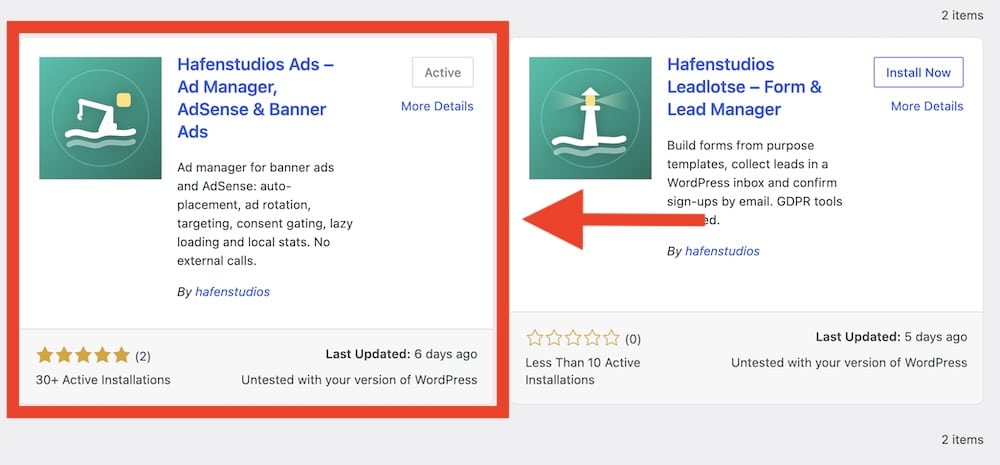
Getting started with Hafenstudios Ads is refreshingly straightforward.
It gives first-time users a guided onboarding panel before they have created any ad blocks.
Note: Read our guide on how to install a WordPress plugin if you haven’t installed one yet.
Instead of dropping you into a blank settings screen, it gives you three clear starting points:
- Google AdSense
- A ready-made template
- Your own HTML
That is a small detail, but a useful one.
If you’re setting up AdSense, you can jump straight into the dedicated assistant.
If you’d rather build a banner, newsletter box, notification bar, popup, or another predefined format, the template gallery is one click away.
And if you already have your own affiliate banner or custom ad code, you can skip the hand-holding and paste it in directly.
Nice.
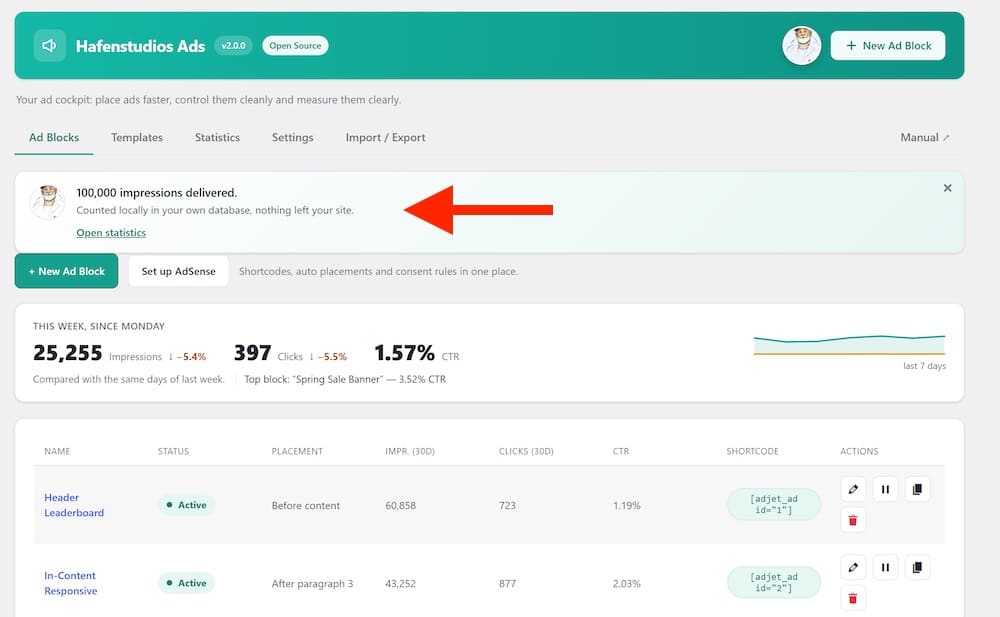
The main Adjet dashboard then acts as the control center for everything.
From there, you can manage ad blocks, templates, statistics, settings, import/export tools, and — with Pro — revenue/geo reporting and split tests.
I also like that the plugin doesn’t force you to configure every setting before doing anything useful.
You can create your first ad first, then come back later to refine placement, targeting, consent rules, statistics, or other options.
This is particularly handy if you’re new to WordPress ad management. You don’t need to understand every feature from day one.
There’s also an optional AI helper built into the onboarding/editor workflow. If you add your own Anthropic API key, it can suggest titles and copy while you’re creating ads.
It’s completely optional, though, so you can ignore it and use the plugin normally.
Pro tip: If this is your first time using Hafenstudios Ads, I’d start with a template rather than raw HTML.
It gives you a much faster look at how the plugin handles content, placement, targeting, and previews before you start building more custom setups.
GET YOUR HAFENSTUDIOS ADS PLUGIN NOW!2. Creating Ads & Using The Template Gallery
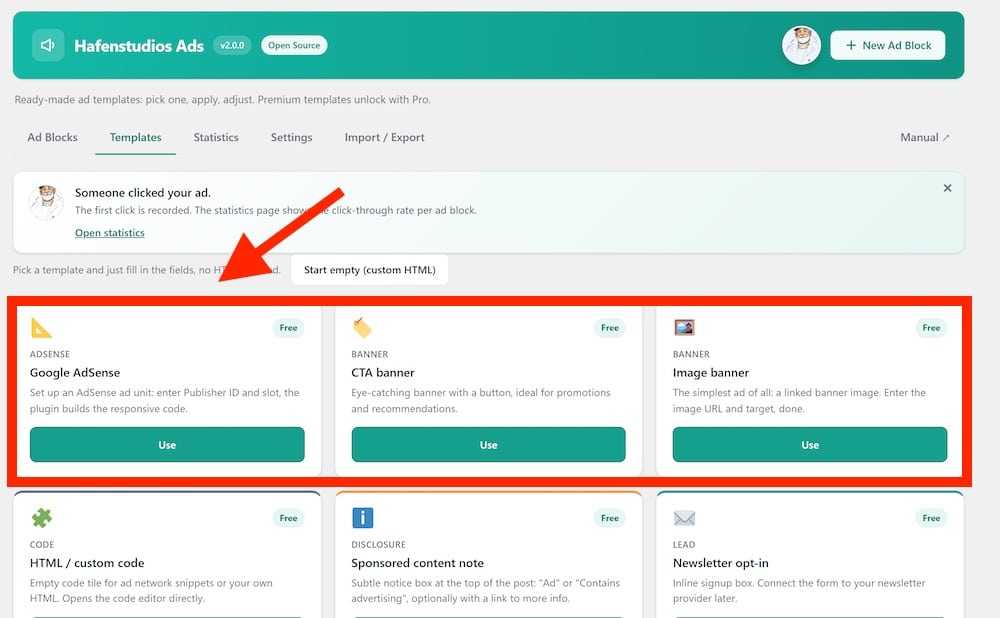
What I really like about Hafenstudios Ads is that creating ads can be as simple or as custom as you want.
You can start with your own HTML or ad-network code, but the Template Gallery is where the plugin becomes much more interesting.
Instead of building every banner or promotional block from scratch, you pick a format and fill in the relevant fields.
The plugin then builds the layout for you.
That includes free templates such as:
- CTA banners
- Image banners
- HTML/custom code blocks
- Sponsored-content notices
- Newsletter opt-ins
- eBook/lead-magnet boxes
- Notification bars
- Sticky bottom bars
- Countdown banners
- Popups
- Cookie-consent banners
Version 2.0 expanded the gallery substantially, with 14 new templates added across Free and Pro.
And these aren’t just decorative presets.
Each template is built around an actual use case.
For example, the image banner only needs the banner image URL, destination URL, alt text and optional corner radius.
A countdown banner gives you dedicated fields for the headline, copy and deadline.
The sponsored-content template even includes separate fields for the advertising label, disclosure text and an optional transparency/privacy link.
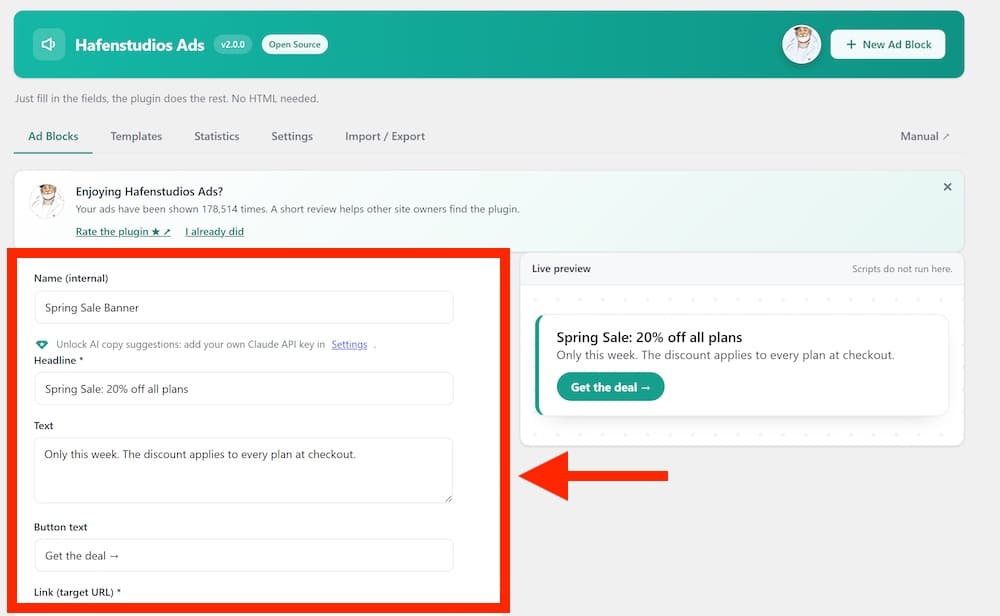
That’s much cleaner than editing a chunk of HTML every time you want to change something. And I don’t like working with HTML (much).
Here’s another nice touch: the editor provides a live preview while you type, so you can see the ad taking shape without constantly saving and checking the frontend.
But you still aren’t locked into templates, though.
You can comfortably take the dedicated HTML / custom code route if that’s your game.
Yup, advanced users can bypass the guided approach entirely when needed.
I think that’s the right balance.
Useful tip: Don’t think of the Template Gallery only as a collection of “ads.” Some templates are better suited to internal promotions, lead generation, affiliate offers or important notices.
That opens Hafenstudios Ads up to quite a few uses beyond simply inserting AdSense banners.
The Pro version expands the gallery even further with formats such as product/affiliate boxes, comparison boxes, native recommendation cards, Google Ad Manager slots, video ads, an ad slider, Welcome Mat and more.
GET YOUR HAFENSTUDIOS ADS PLUGIN NOW!3. Automatic & Manual Ad Placement
One of Hafenstudios Ads’ biggest strengths is how flexible the placement system is.
You don’t have to manually paste ad code into every post or template.
For automatic placement, you can insert ads:
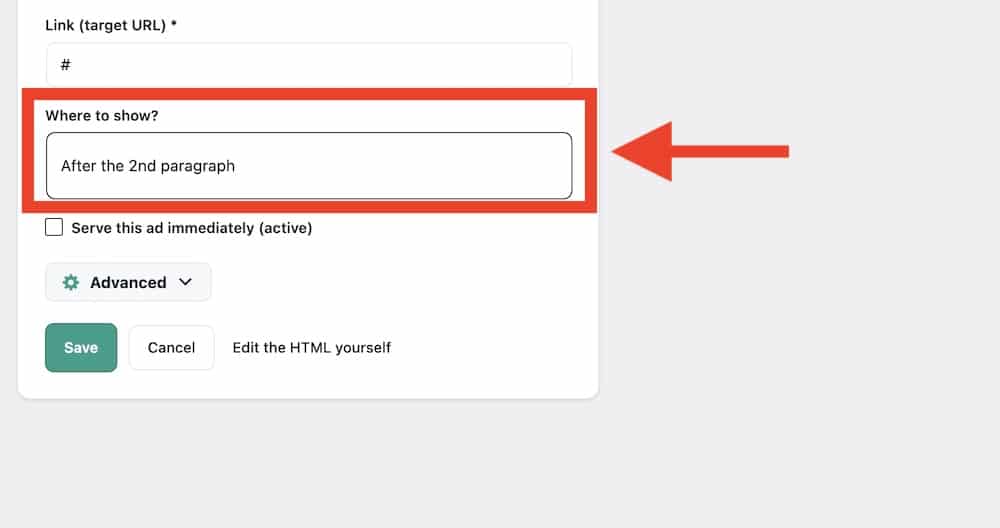
- Before content
- After content
- After a specific paragraph
- After the first image
- Between posts in archive/listing views
That last option is new in 2.0 and is especially useful for blogs, news sites, magazines, or any site where visitors browse through post listings.
For example, you could place an affiliate offer after paragraph three in long-form content, add a banner after the first image, or show an ad between posts on a category page without touching the theme files.
That saves a lot of repetitive work.
But automatic placement isn’t your only option.
You can also insert ads manually using:
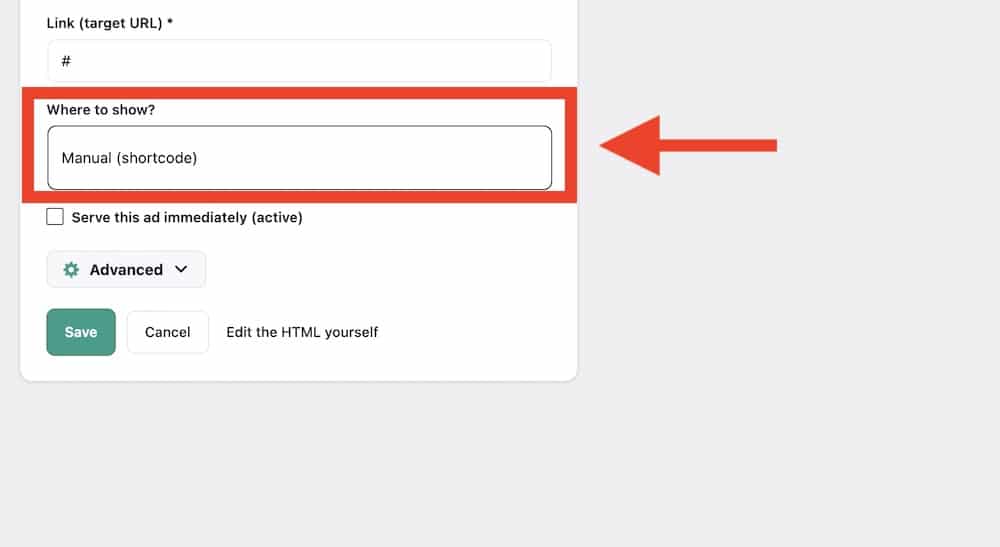
- A Gutenberg block
- A shortcode
- A widget
This is handy when you want exact control.
Maybe you want a sponsor box in one specific article, an affiliate banner inside a custom landing page, or a promotion in the sidebar.
Manual placement gives you that freedom without forcing every ad into a global rule.
Ad Groups & Weighted Rotation
Hafenstudios Ads also supports ad groups with weighted rotation.
This means several ads can share the same placement instead of displaying the exact same creative every time.
The weighting is the interesting part.
You’re not limited to a simple 50/50 rotation. You can give one ad a higher share of the impressions than another.
For instance, if one sponsor should receive roughly twice as much exposure as another, you can adjust the weighting accordingly.
That’s useful for:
- Running several sponsor campaigns in one location
- Rotating your own affiliate offers
- Testing different promotional creatives
- Giving priority to a higher-value campaign
- Preventing the same banner from appearing endlessly
I particularly like the combination of automatic placement + rotation.
Pro tip: Don’t automatically place ads everywhere just because you can.
A few well-chosen placements usually create a cleaner reading experience than stuffing a banner into every available position.
GET YOUR HAFENSTUDIOS ADS PLUGIN NOW!4. AdSense Setup
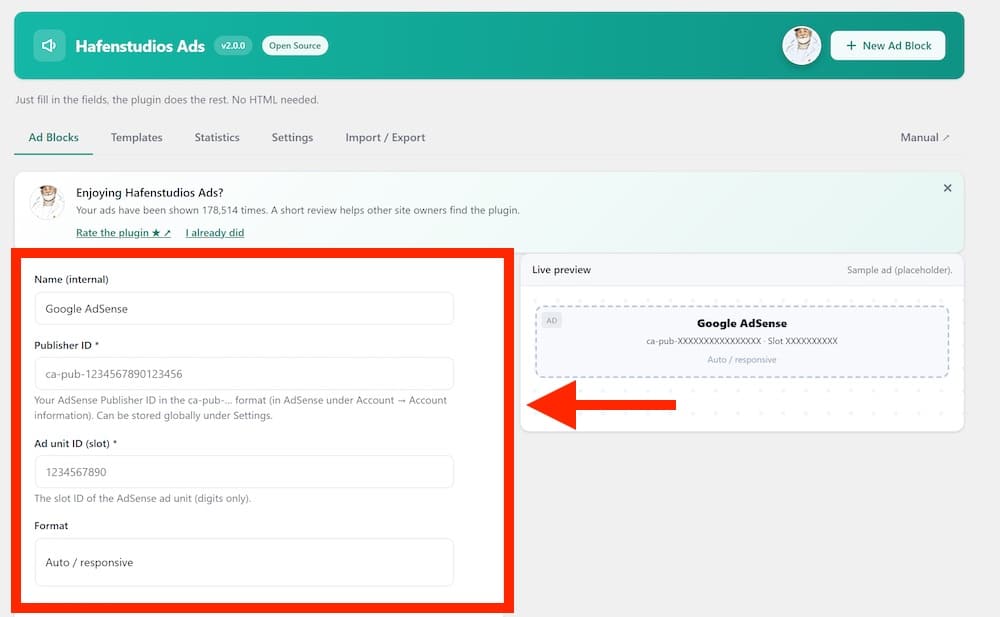
If you use Google AdSense, Hafenstudios Ads makes the setup a piece of cake.
Instead of pasting a full AdSense code snippet into WordPress, you can use the built-in AdSense Wizard.
All you need is:
- Your Publisher ID
- Your Ad Slot ID
- Your preferred format
The plugin then generates the responsive AdSense unit for you.
In the latest version, the template defaults to responsive behavior, and the editor includes a visual preview so you can confirm the setup before publishing it.
The plugin accepts a standard ca-pub-… Publisher ID, lets you enter the individual slot ID, and provides format controls inside the ad editor.
Smart AdSense Script Loading
This is where things get a little more interesting.
Hafenstudios Ads does not simply load Google’s AdSense script everywhere by default.
For normal AdSense blocks, the loader is only added when a page actually contains an AdSense unit created through the plugin.
That avoids loading the script on pages where it isn’t needed.
There’s also optional support for Google Auto Ads.
AdSense + Consent
Hafenstudios Ads also ties AdSense loading into its consent system.
If an AdSense block requires consent, the plugin can keep Google’s loader from firing until the required consent has been granted.
I verified this behavior in the 2.0 Pro code as well.
If all AdSense blocks on a page require consent, the plugin holds back the Google loader and injects it only after consent is available. If an AdSense block does not require consent, the loader can be added normally.
That is a much cleaner approach than displaying the ad container first and worrying about consent afterward.
One thing worth knowing: using Hafenstudios Ads does not make Google AdSense itself local or private.
Once AdSense is enabled, Google’s own adsbygoogle.js is loaded from Google’s servers. Hafenstudios keeps its own statistics local, but third-party ad networks still operate according to their own services and privacy policies.
I really like how Hafenstudios Ads handles AdSense: Beginners avoid dealing with raw code, while more experienced users still get useful control over placement, targeting, consent, scheduling, and loading behavior around each AdSense unit.
GET YOUR HAFENSTUDIOS ADS PLUGIN NOW!5. Targeting & Campaign Scheduling
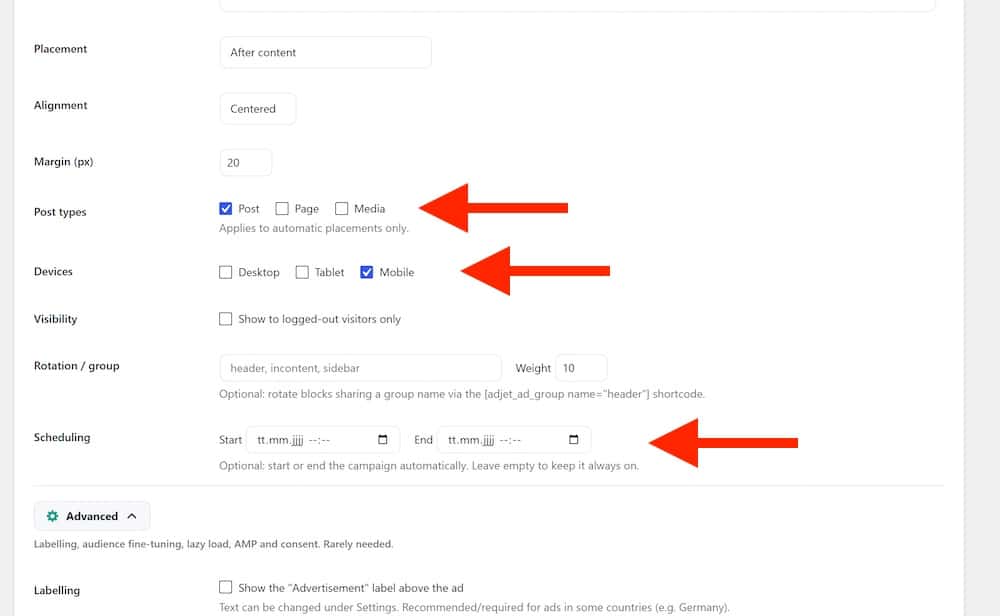
Good ad placement is only half the job.
You also want the right ad to appear to the right visitor, on the right content, at the right time.
Hafenstudios Ads gives you a solid set of targeting controls in the free version, which is something I really like.
You can target ads by:
- Device
- Post type
- Categories
- Tags
- Custom taxonomy terms
Version 2.0 also added targeting for categories and tags, which gives you more control than simply excluding content.
For example, you could show a mockup-related affiliate banner only on mockup posts, display a hosting promotion only inside your WordPress category, or keep a certain campaign away from landing pages entirely.
Device Targeting
You can also decide whether an ad appears on:
- Desktop
- Tablet
- Mobile
This is practical for more than just fitting different banner sizes.
Maybe a mobile visitor should see a compact sticky bar, while desktop users get a larger banner inside the content.
Or perhaps one campaign simply performs better on mobile.
Instead of forcing the same creative everywhere, you can tailor it.
Campaign Scheduling
Hafenstudios Ads also lets you set start and end dates for campaigns.
That sounds basic, but it can save a surprising amount of manual work.
You can prepare a Black Friday promotion in advance, schedule a sponsored campaign for a fixed period, or automatically stop showing an expired offer without having to remember to log back into WordPress on the final day.
Publish it.
Let the schedule handle the rest.
I particularly like this for paid sponsorships because you can define the campaign window when you create the ad instead of relying on your calendar to remind you later.
Free Vs Pro Targeting
The important thing here is that the free version already covers the targeting most smaller websites will actually need.
Adjet Pro goes deeper with:
- Referrer targeting
- Weekday targeting
- Hour-based targeting
- Country-code geo delivery
Pro tip: Use targeting with restraint.
Creating twenty tiny audience rules for every campaign can quickly become harder to manage than the ads themselves. Start broad, then narrow the targeting when there’s a clear reason to do so.
GET YOUR HAFENSTUDIOS ADS PLUGIN NOW!6. Consent Gating & Lazy Loading
Privacy and performance are easy to overlook when setting up ads.
Here, you have useful controls for both.
Consent Gating
The plugin supports consent-cookie gating for common consent tools.
In simple terms, you can prevent an ad block from loading until the required consent has been granted.
That is especially important for things like:
- Google AdSense
- Third-party ad scripts
- Tracking-heavy embeds
- Marketing-related promotional blocks
The 2.0 also includes a cookie-consent banner template with Consent Mode v2 support, so consent is not treated as an afterthought.
I like that consent is handled at the ad-block level.
You don’t necessarily need to treat every ad the same way.
A simple internal banner may not need gating at all, while an AdSense block or third-party script might.
That gives you much more control.
And as I mentioned in the AdSense section, Hafenstudios Ads can also delay the AdSense loader itself until consent is available when gating is enabled.
Lazy Loading
Hafenstudios Ads also supports lazy loading through IntersectionObserver.
Instead of loading every eligible ad immediately when the page opens, the browser can wait until the ad approaches the visitor’s viewport.
That can be particularly useful on long articles with several ad positions.
Why load an ad near the bottom of a 3,000-word post before the visitor is anywhere close to it?
Exactly.
Used properly, lazy loading can reduce unnecessary work during the initial page load and keep heavier ad placements from competing with the main content straight away.
Pro tip: I wouldn’t automatically enable lazy loading for every single ad. If a banner sits right at the top of the page, delaying it may not give you much benefit.
It becomes more useful for placements further down the content, between posts, or in other areas visitors may never reach.
GET YOUR HAFENSTUDIOS ADS PLUGIN NOW!7. Local Statistics & Cache-Proof Tracking
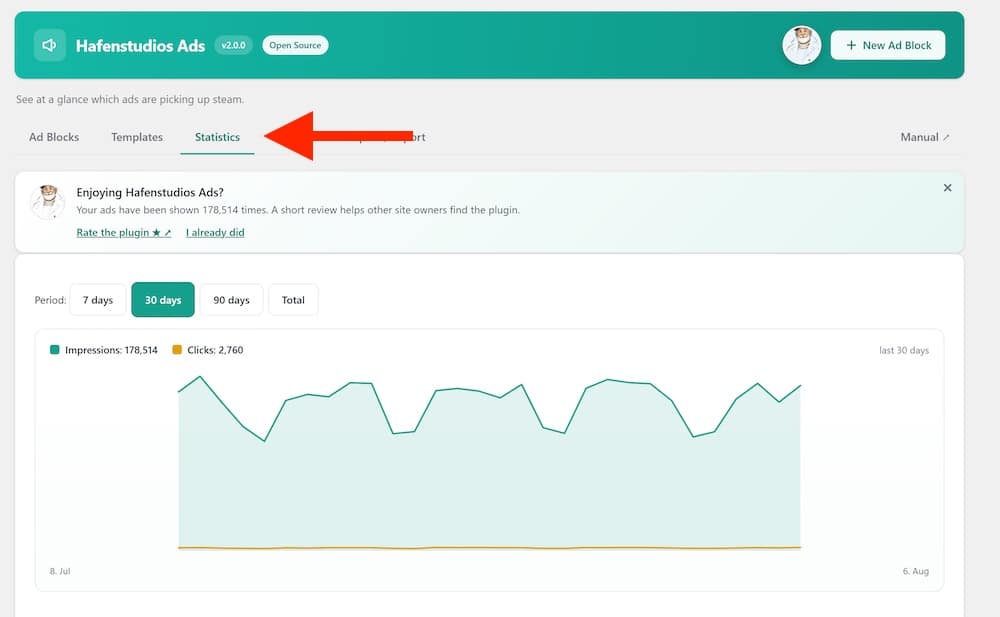
This is probably one of the most interesting parts of Hafenstudios Ads.
The plugin can track:
- Impressions
- Clicks
- CTR
- Performance per ad block
You also get a 30-day chart and a weekly summary, all directly inside WordPress.
Nothing fancy for the sake of being fancy.
Just the numbers you actually need to see whether people are viewing and clicking your ads.
Your Ad Statistics Stay Local
What separates Hafenstudios Ads from many analytics-heavy tools is where those statistics are stored.
Impressions and clicks are saved inside your site’s own WordPress database rather than being sent to a Hafenstudios analytics service.
No external analytics server.
It creates its own statistics table and stores aggregated daily event counts for each ad block.
CTR is then calculated from those locally stored impressions and clicks.
That means you aren’t creating another external analytics account just to find out whether banner A received more clicks than banner B.
Simple. I like it.
One important distinction, though: local Hafenstudios statistics don’t mean everything an ad contains is local.
If you insert Google AdSense or another third-party advertising script, that service can still make its own external requests.
The local-data claim applies to Hafenstudios Ads’ own statistics, not to third-party code you choose to run through it.
Why “Cache-Proof” Tracking Matters
Version 2.0 made a significant change to how these statistics are recorded.
Earlier WordPress-style tracking approaches can rely on security nonces that expire after a limited period. That’s normally fine.
But heavily cached pages create a problem.
A page can sit inside a page cache or CDN/edge cache for much longer than the nonce embedded in that page remains valid.
Visitors may then continue receiving the cached page while its tracking token has already expired.
Result?
The page still works, but some tracking requests can stop being counted correctly.
Hafenstudios Ads specifically reworked this system so impression tracking no longer depends on an expiring nonce.
One Beacon Instead Of Multiple Requests
There’s another smart detail behind the scenes.
When several Hafenstudios Ads blocks appear on one page, version 2.0 can bundle their impressions into one impression beacon per page instead of firing a separate tracking request for every block.
That keeps the tracking process leaner.
The frontend code prefers the browser’s sendBeacon method for sending the event, with a fallback when necessary.
It’s one of those technical details most users will never notice.
Which is exactly how it should be.
But Removing The Nonce Doesn’t Mean Removing Protection
This was something I specifically wanted to check.
If the tracking endpoint no longer relies on a WordPress nonce, how is bogus traffic prevented from simply hammering it?
Version 2.0 adds several safeguards:
- Only recognized event types are accepted
- Ad block IDs are validated
- Requests are rate-limited by IP
- Impression IDs are bundled and validated before being counted
The supplied 2.0 fact sheet describes the same combination of event whitelisting, block validation and IP rate limiting.
The actual plugin code currently limits the tracking endpoint to a maximum of 120 events per IP per minute.
I like this implementation because it addresses the cache problem without simply leaving the tracking endpoint wide open.
Reporting Was Improved Too
There are a few smaller 2.0 improvements here that are easy to miss.
The statistics database table now has a dedicated date index, which helps speed up reports that query historical data.
The plugin also caches aggregated statistics briefly in WordPress’ object cache rather than recalculating the same totals on every admin request.
And there’s a thoughtful change in the weekly reporting.
Instead of comparing part of the current week against an entire previous week — which could make Monday morning look catastrophically bad for no reason — Hafenstudios Ads compares the current week against the same weekdays of the previous week.
That’s a small detail.
But it’s exactly the kind of detail I appreciate in an analytics dashboard because the comparison is actually useful instead of technically correct but misleading.
GET YOUR HAFENSTUDIOS ADS PLUGIN NOW!8. Newsletter Opt-Ins As Ad Blocks
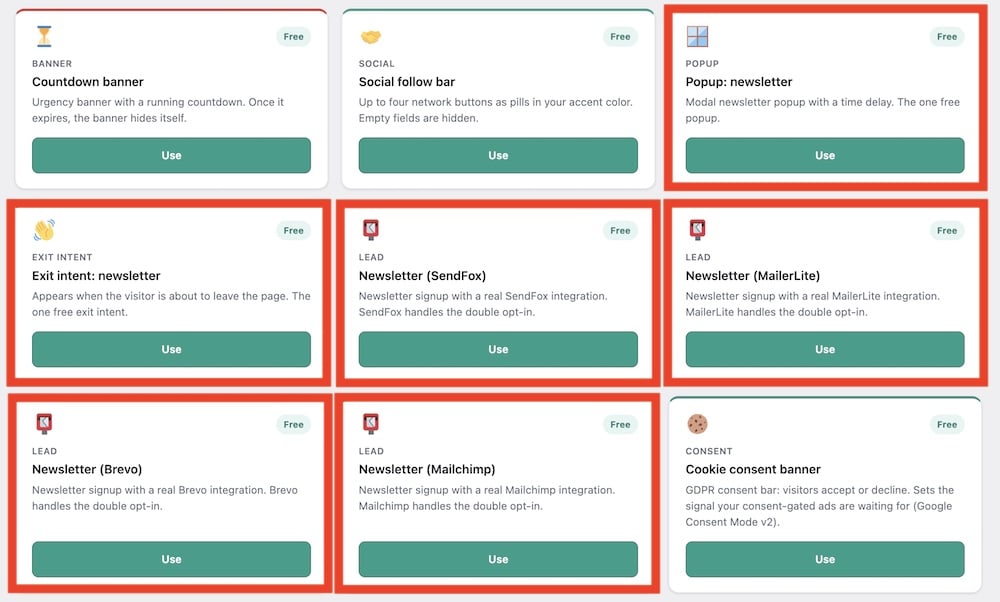
This is one of the more unusual features in Hafenstudios Ads.
The plugin isn’t limited to traditional advertising.
You can also use a newsletter opt-in as an ad block and connect it directly to:
- SendFox
- MailerLite
- Brevo
- Mailchimp
The integration is native and uses your own API token for the selected provider.
That means you don’t need to paste a third-party newsletter form into the ad manager.
Instead, you can create the opt-in from the Template Gallery, connect your provider, choose the destination list, and then treat that signup form much like any other Hafenstudios Ads block.
That’s where it gets interesting.
Your Newsletter Form Can Use The Ad Placement System
Because the opt-in is handled as an ad block, you can place it using the same system we’ve already covered.
For example, you could show a newsletter signup:
- After a specific paragraph
- After the first image
- At the end of an article
- Inside a widget area
- Through a shortcode
- In selected categories only
So instead of thinking only in terms of “where can I place an ad?”, you can also use those placements for email list growth.
For a content-heavy site, that’s genuinely useful.
You might place an affiliate banner in one location and a newsletter signup farther down the article without needing a separate lead-generation plugin just for that basic workflow.
Connecting A Provider Is Pretty Simple
Hafenstudios Ads lets you add the API credentials for each supported newsletter service from its settings.
The plugin then retrieves the available lists from that provider, so you can select the destination list while configuring the newsletter block.
It also stores the provider tokens encrypted and uses them server-side only, rather than exposing them in the frontend.
That’s a detail I definitely like.
What About Double Opt-In?
Hafenstudios Ads leaves the double-opt-in process to the connected newsletter provider.
I checked how this works in the plugin itself.
For Mailchimp, for example, Hafenstudios Ads sends the subscriber with the status set to pending, which triggers Mailchimp’s confirmation process.
For the other integrations, the plugin submits the contact to the provider and lets that service handle the appropriate opt-in workflow.
So Hafenstudios Ads handles the form and connection, while your newsletter platform remains responsible for the actual subscriber confirmation process.
GET YOUR HAFENSTUDIOS ADS PLUGIN NOW!9. Other Useful Free Features
- AI copy suggestions: Add your own Anthropic API key and the guided assistant can suggest ad titles and copy. The AI functionality runs from the WordPress admin side and is completely optional.
- REST API: Developers can work with Hafenstudios Ads through the adjet/v1 REST API using WordPress Application Passwords. This could be useful for custom workflows or external management tools.
- Dedicated user capability: The plugin uses a separate manage_adjet capability instead of simply giving every user full ad-management access. There’s also an editor toggle if you want trusted editors to manage ads.
- JSON import/export: You can export your setup and import it again later, which becomes handy for backups, migrations, or recreating a similar ad setup on another site.
- One-click duplicate and pause: Existing ad blocks can be quickly duplicated or temporarily paused without deleting them. Useful when you’re working with recurring campaigns or similar creatives.
- Data isn’t deleted automatically: Uninstalling the plugin keeps its data unless you specifically tell Hafenstudios Ads to remove it. That’s a safer default if you’re temporarily disabling or reinstalling the plugin.
- Free A/B testing: Since version 2.2.0, the free plugin includes a dedicated Split-Tests page. It compares variants in a rotation group using impressions, clicks and CTR, and shows which one is ahead once each variant reaches 100 impressions. Statistical significance remains Pro-only.
10. What Does Adjet Pro Add?
Adjet Pro 2.0 adds:
- Advanced triggers: Show ads based on scroll depth, page count, inactivity, or exit intent. This is useful for slide-ins, popups, and offers that shouldn’t appear immediately.
- Advanced split testing: Hafenstudios Ads Free can now compare variants inside a rotation group, showing impressions, clicks, CTR and which one is ahead after 100 impressions per variant. Pro goes further with unlimited tests, statistical significance analysis, AI-assisted variants and winner explanations.
- Referrer targeting: Show different campaigns depending on where visitors came from.
- Weekday and hour targeting: Control when campaigns appear by day and time. These rules are evaluated in the browser, which helps them remain accurate on cached pages.
- Country-based delivery: Target ads by country code. In the actual Pro 2.0 code, geo detection uses available server/CDN country headers rather than sending visitor IPs to a separate GeoIP lookup service.
- Premium templates: Pro adds formats such as slide-in boxes, native recommendation cards, product/affiliate boxes, Google Ad Manager slots, video ads, comparison boxes, ad sliders, content locker light, Welcome Mat, and discount popups.
- Google Ad Manager support: The dedicated GAM template handles GPT loading and avoids loading the library multiple times on the same page.
- Adblock recovery: Adblock-rate measurement is available in Free, while Pro adds a recovery bar you can show when blocking is detected.
- CSV export: Export campaign statistics for reporting, spreadsheets, or client analysis.
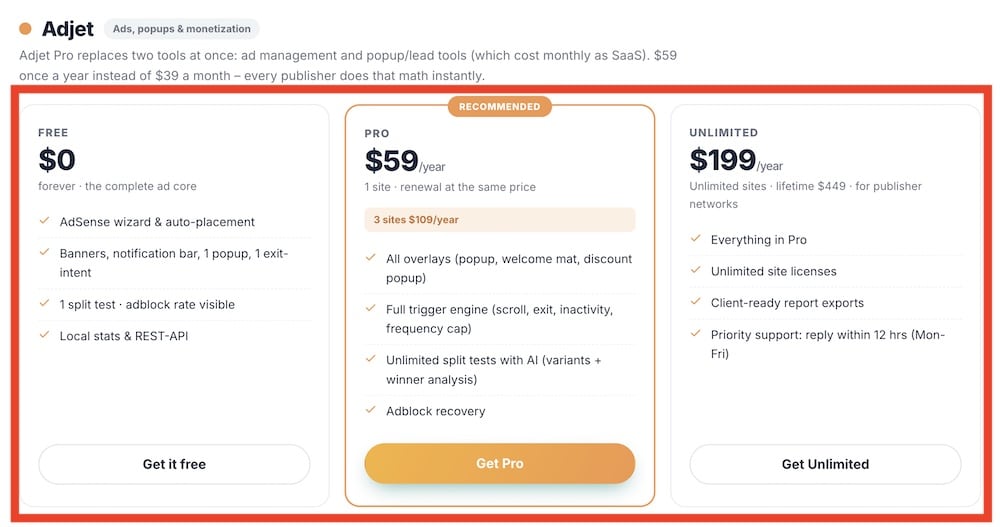
Adjet Pro Pricing
At the time of the 2.0 release material, pricing is:
- $59/year – 1 site
- $109/year – 3 sites
- $199/year – unlimited sites
- 14-day free trial
11. What I Like Most About Hafenstudios Ads
- The free version is genuinely useful: Automatic placements, weighted rotation, scheduling, device/content targeting, consent gating, lazy loading, AdSense tools, and local statistics are already included. You don’t need Pro just to unlock the basics.
- Statistics stay under your control: Hafenstudios Ads stores its own impressions, clicks, and CTR data inside the site’s database rather than sending those numbers to a Hafenstudios analytics server. That’s a strong privacy-focused design choice.
- Placement flexibility is excellent: You can automate ads before/after content, after a chosen paragraph, after the first image, or between posts, while Gutenberg blocks, widgets, and shortcodes cover manual placement.
- The Template Gallery saves time: Instead of building every promo from scratch, you can start with ready-made formats for banners, sticky bars, countdowns, popups, newsletter forms, disclosures, and more.
- AdSense setup is beginner-friendly: The dedicated wizard turns Publisher ID + Slot ID into a responsive unit and works with the plugin’s targeting, placement, consent, and loading controls.
- Newsletter opt-ins are a clever addition: Native SendFox, MailerLite, Brevo, and Mailchimp integrations let you use the same placement system for list building, not just advertising.
- Pro targeting is built with cached sites in mind: Referrer and time-based rules are evaluated in the browser, helping them stay useful even when pages are served from cache. That’s a thoughtful implementation detail.
- It works for more than display ads: Affiliate boxes, internal promotions, newsletter forms, sponsored-content notices, comparison units, and other templates give it broader use than a basic banner inserter.
- Advanced users aren’t forgotten: The REST API, Application Password support, dedicated manage_adjet capability, JSON import/export, and configurable editor access add useful flexibility for developers and agencies.
12. What Could Be Better?
- The naming could be clearer: The free plugin is officially Hafenstudios Ads, while the premium edition continues under the Adjet Pro name. Honestly, it’d be easier if it were Hafenstudios Ads Free and Hafenstudios Ads Pro.
- The statistics are useful, but intentionally focused: Impressions, clicks, CTR, charts, geo/device data, adblock measurements, and Pro reporting cover the essentials well. However, I wouldn’t treat Hafenstudios Ads as a replacement for a dedicated analytics or attribution platform if you need very deep campaign analysis.
- Split-test results should be treated as guidance, not scientific proof: I checked the Pro 2.0 code, and a variation becomes eligible to win once it reaches 50 impressions. The winner is then based primarily on CTR. That’s useful for quickly comparing creatives, but 50 impressions can still be a very small sample. For important campaigns, I’d let tests gather considerably more traffic before making a final decision.
- Consent gating doesn’t replace a proper consent solution: Hafenstudios Ads can wait for a configured consent cookie and control when certain ads load, but the plugin itself explicitly states that it does not replace a consent management tool or provide legal advice. That’s an important distinction, particularly if you’re using AdSense or other third-party advertising services.
- The number of options can grow quickly: This isn’t a problem when you’re managing a couple of banners. But once you combine placements, groups, schedules, targeting rules, templates, triggers, and split tests across many campaigns, there’s naturally more to manage. I’d keep a clear naming system for ad blocks from the beginning rather than ending up with “Banner 7 Final FINAL 2.” Been there. 🙂
13. Who Should Use Hafenstudios Ads?
- Bloggers and content publishers: Automatic placements, scheduling, rotation, and local statistics cover the core tools you need without forcing you into a complex ad platform.
- Google AdSense users: The built-in AdSense Wizard simplifies setup, while placement controls, consent gating, and conditional script loading give you more control over where and how AdSense appears.
- Affiliate marketers: You can manage affiliate banners, promotional boxes, internal offers, and rotating campaigns from one place. Pro becomes even more useful with product/affiliate boxes, comparison templates, split testing, and behavioral triggers.
- Sites selling direct advertising: If you work directly with sponsors, scheduling, weighted rotation, impressions, clicks, CTR, and campaign-level reporting make it much easier to manage placements without manually swapping banners.
- Website owners who want more than ads: Newsletter opt-ins, sponsored-content notices, sticky bars, countdowns, popups, and other templates mean you can also use Hafenstudios Ads for internal promotions and lead generation.
- Agencies and developers: The REST API, JSON import/export, dedicated manage_adjet capability, editor access controls, and locally managed data make the plugin more interesting when you’re working across client projects or custom workflows.
- Beginners who don’t want to touch ad code: The guided setup, templates, live preview, and AdSense assistant remove much of the technical friction from creating and placing your first ads.
14. Who Should Upgrade To Adjet Pro?
Adjet Pro is particularly worth considering if you:
- Want behavior-based triggers: Use scroll depth, page count, inactivity, or exit intent.
- Need A/B testing: Compare ad variations and see which one performs better.
- Want deeper targeting: Target by referrer, weekday, hour, or country.
- Run location-specific campaigns: Show different ads to visitors from different countries.
- Need more ad formats: Unlock product boxes, comparison boxes, slide-ins, video ads, Welcome Mats, discount popups, and more.
- Use Google Ad Manager: Pro includes a dedicated GAM slot template.
- Want adblock recovery: Show a recovery bar when an ad blocker is detected.
- Need CSV exports: Export campaign data for reports or spreadsheets.
- Manage client sites: Pro is much more useful for agencies and larger ad setups.
Conclusion: Is Hafenstudios Ads Worth Using?
Yes, Hafenstudios Ads is worth using, especially if you want strong ad-management features without immediately paying for Pro.
The free version already covers automatic and manual placements, rotation, scheduling, targeting, consent controls, AdSense, newsletter opt-ins, and local statistics.
Version 2.0 also brings meaningful improvements under the hood, especially the cache-proof tracking system.
Adjet Pro is the better choice once you need advanced triggers, A/B testing, deeper targeting, geo delivery, premium templates, adblock recovery, or CSV exports.
The only real drawback is that Hafenstudios Ads is still a young plugin with a limited public track record.
But based on what version 2.0 already offers, I think it has a lot of potential.
My recommendation: Start with Free. Upgrade to Adjet Pro only when you actually need the extra control.
GET YOUR HAFENSTUDIOS ADS PLUGIN NOW!


