

I’m excited to share my review of the WooCommerce Simple Auctions plugin.
Let’s face it, WooCommerce auctions feel scary until you actually try to set them up. Not anymore!
That’s where WooCommerce Simple Auctions comes in.
This plugin bolts straight onto WooCommerce and turns your regular store into an eBay-style auction site with multiple auction types, live bidding, and all the familiar checkout flows your customers already know.

It’s sold as a premium auction plugin on CodeCanyon for $55, with over 8,000 sales and 10+ years of active development behind it.
Congrats, team WPGenie.
In this review, I’ll walk you through what it does, its best features, how it feels to use, and where it falls short (or does it?).
By the end, you’ll know if it’s the right “engine” for your upcoming auction project idea.
This post covers:
- WooCommerce Simple Auctions WordPress Plugin Review
- Conclusion: Is The WooCommerce Simple Auctions Plugin Right For You?
- FAQs About WooCommerce Simple Auctions WordPress Plugin
WooCommerce Simple Auctions WordPress Plugin Review
1. What Is The WooCommerce Simple Auctions WordPress Plugin?

WooCommerce Simple Auctions is a premium WooCommerce extension that adds a new “Auction” product type to your store.
So awesome!
You can run regular, proxy, sealed (silent), and reverse auctions alongside normal products, so you don’t need a separate auction platform.
Very convenient.
What’s best, you manage everything from the usual WooCommerce product editor:
- Choose auction type (normal, reverse, proxy, sealed)
- Set starting price, bid increment, reserve price, and buy-now price
- Schedule start/end time and configure anti-sniping rules
- Let users bid, watch auctions, and check their history from front-end pages
The plugin is actively maintained, supports modern latest PHP, and works with the newest WordPress + WooCommerce stack.
If your goal is to “clone” the core idea of eBay inside a Woo store, this is one of the most proven ways to do it.
And it’s super beginner-friendly!
MORE INFO/DOWNLOAD YOUR SIMPLE AUCTIONS PLUGIN NOW!2. 8 Best WooCommerce Simple Auctions Plugin Features
1. Multiple Auction Types (Normal, Proxy, Sealed & Reverse)
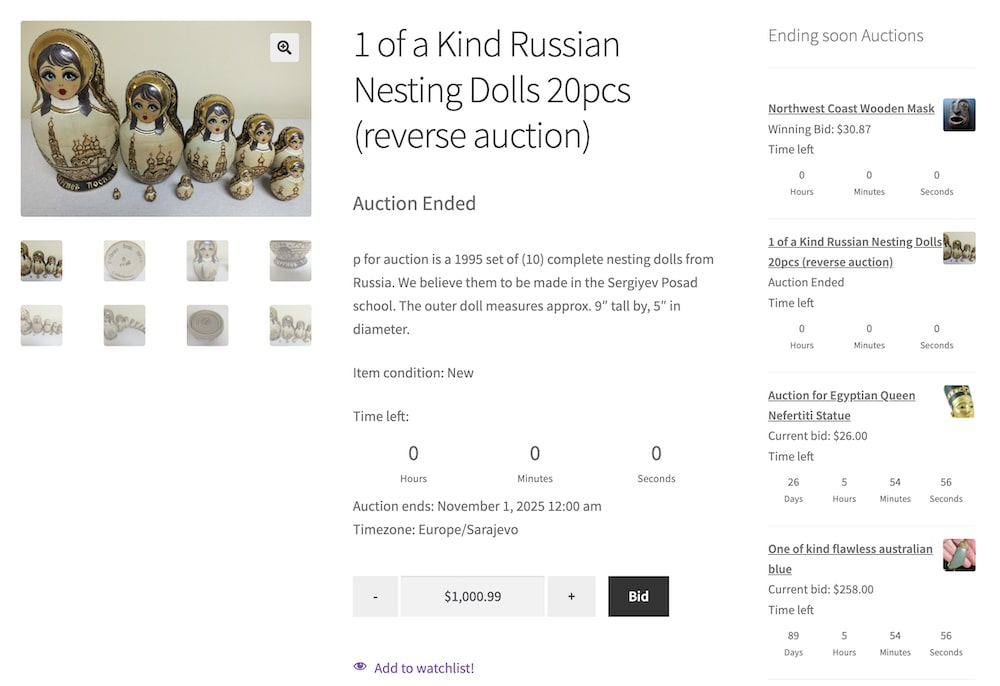
This is the heart of the plugin.
You’re not stuck with just a basic “highest bid wins” setup.
It goes way beyond that!
Simple Auctions supports several auction types, allowing you to mimic real-world marketplaces.
- Normal auctions: classic highest-bid-wins flow
- Reverse auctions: price counts down; great for service providers
- Sealed/silent auctions: bids are hidden until the auction ends
- Proxy/auto bidding: users set a max, and the system bids up for them
This flexibility lets you experiment with different auction formats and find what converts best for your audience.
2. Deep WooCommerce Integration (Feels Native)
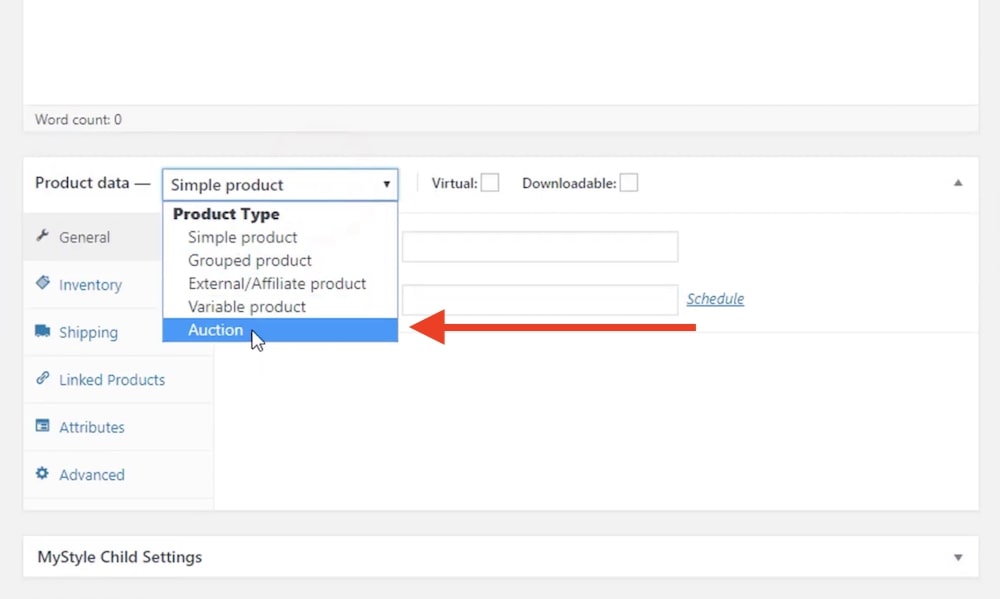
Simple Auctions doesn’t feel like a foreign module bolted on the side.
It integrates directly into WooCommerce as a custom product type, using existing hooks, product data tabs, and your theme’s templates.
- Auction products live in the same Products list as normal items
- You keep your existing theme, cart, and checkout
- Works with any payment gateway supported by WooCommerce
- Supports WooCommerce HPOS and REST API for more advanced setups
For you, that means no weird “second system” to manage.
For your users, it feels like just another type of product in your store.
3. Fine-Grained Auction Controls (Start/End, Reserve & Buy Now)
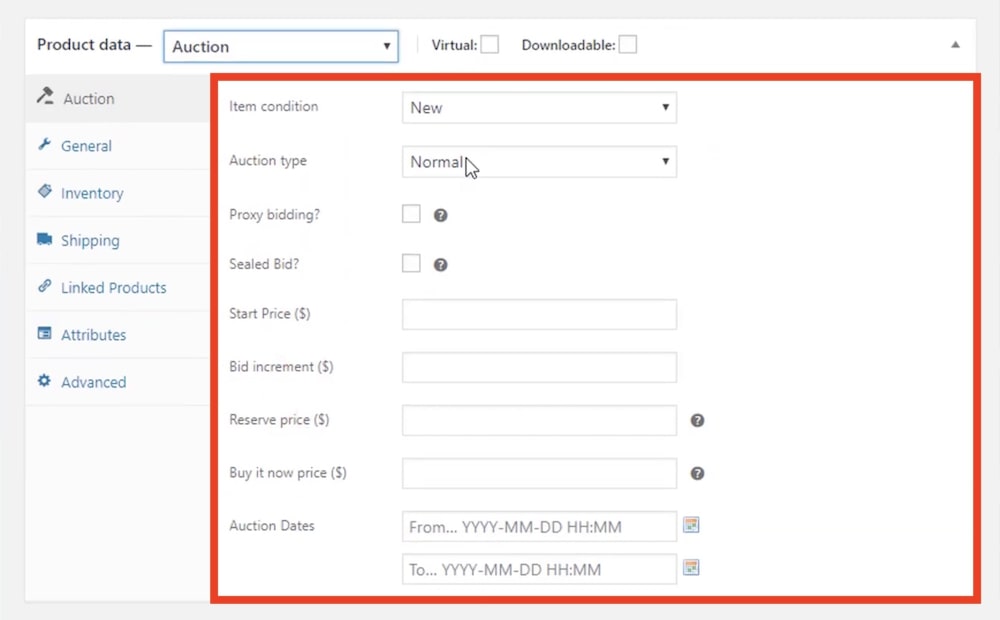
From the auction settings, you control exactly how each auction behaves.
This is where you tune your profit margins and bidding dynamics.
- Start price: minimum opening bid
- Bid increment: minimum step between bids
- Reserve price: minimum you’re actually willing to accept
- Buy Now price: lets users skip bidding and purchase instantly
- Start & end time: schedule auctions or start them immediately
You can mix and match these settings per product.
For example, a sealed auction with a reserve price and no buy-now option for premium collectibles.
Or a fast, low-priced reverse auction to move old inventory.
4. Anti-Sniping & Auto-Relist For Real Auction Flow
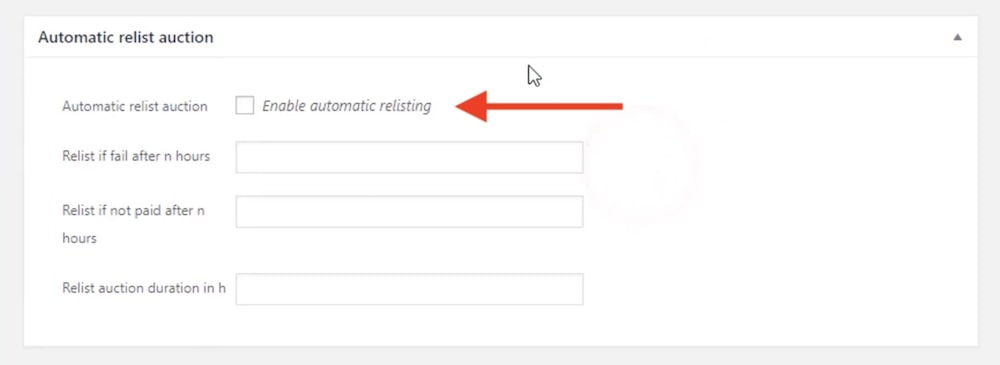
If you’ve ever watched last-second bids steal an auction, you know why anti-sniping matters.
Simple Auctions lets you extend the auction’s end time if someone bids in the final X seconds, keeping bidding fair and lively.
- Anti-sniping: configurable extension window (for example, +45 seconds)
- Avoids “one-second snipers” winning unfairly
- Keeps real buyers engaged for longer
- Works nicely with proxy bidding so users don’t have to camp the page
Combined with relisting options (via settings or manual control), you can keep your auction inventory fresh without constant babysitting.
5. Live Ajax Bidding & Real-Time Updates
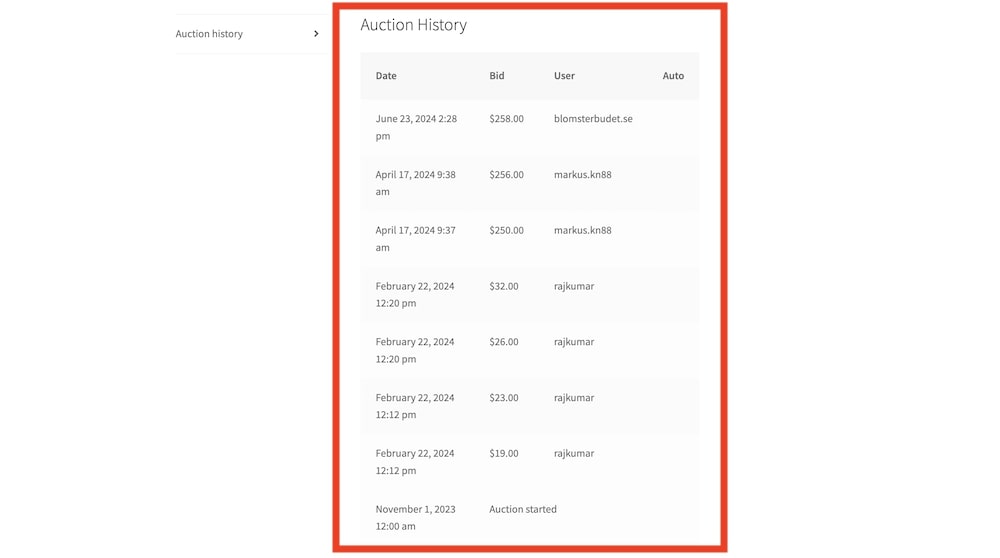
Modern auctions need to feel alive.
Simple Auctions uses Ajax to update current bids and auction history without full page reloads, on single auction pages and product loops.
- Users see live bid changes and countdown timers
- Ajax bidding from the product page, plus optional loop-level bidding
- Compact or extended countdown formats for different layouts
- Smoother UX, especially on mobile
The result is a smoother, more “real-time” feeling auction that doesn’t feel clunky or outdated.
6. “My Auctions”, Watchlists & Email Alerts
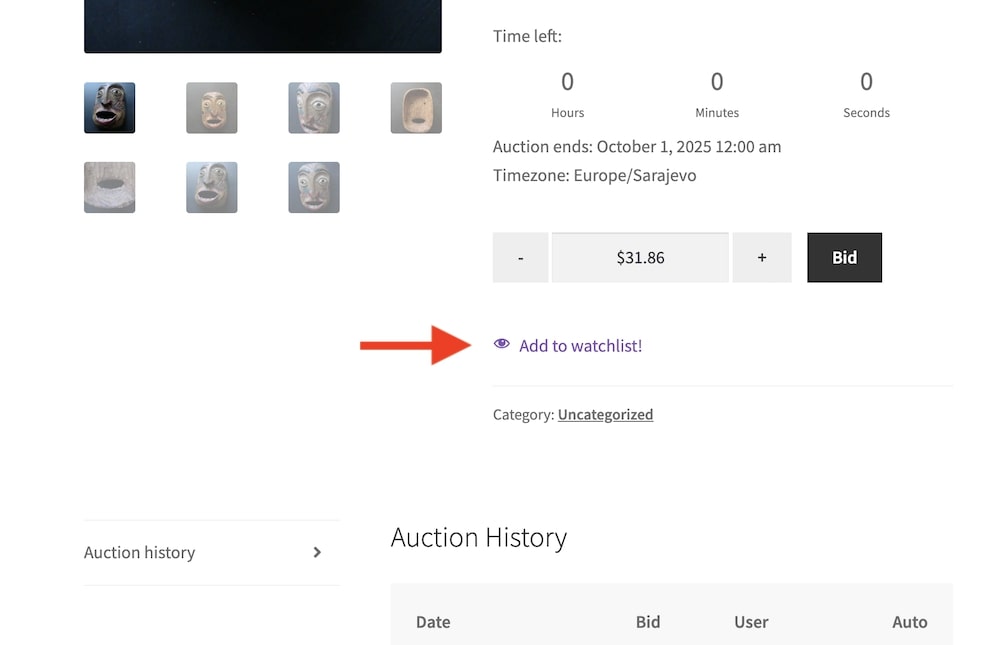
Users need clarity: what they’re bidding on, winning, losing, and when auctions end.
Simple Auctions covers this with a nice set of front-end tools and email notifications.
- My Auctions page: shows auctions a user is involved in (active + won)
- Watchlist: track auctions without bidding yet
- Auction history tab on product page
- Email notifications for: outbid alerts, auction won / lost, payment reminders, auction ending soon / relisted
7. Stripe Card Storage & Automatic Charging
One standout feature is how the plugin can require a stored credit card and even auto-charge winners if you use Stripe.
- Allow bidding only if a Stripe card is stored on the account
- Optionally auto-charge for won auctions
- Reduce non-paying winners
- Create a more serious, high-intent bidding environment
For higher-value auctions, this is huge.
You waste less time chasing payments and can treat auctions as a solid revenue stream instead of “maybe” money.
8. Addons & Marketplace Integrations
Simple Auctions has grown into an ecosystem.
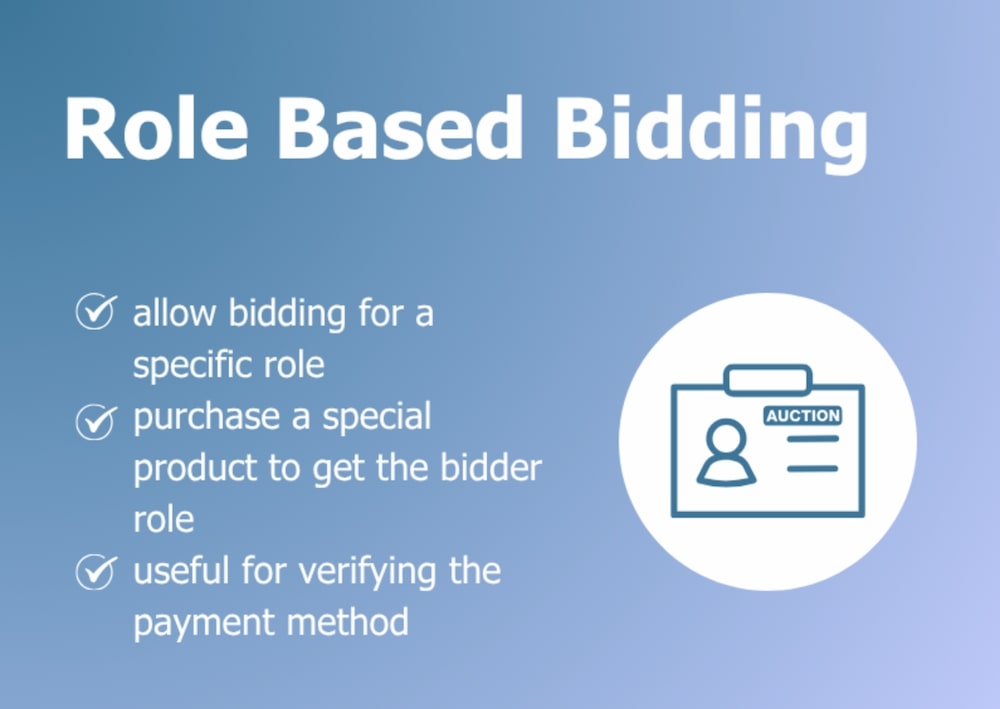
On top of the core plugin, WPGenie offers mods like Role Based Bidding & Payment Verification, Bid Credits, and Seated Auctions.
- Role Based Bidding & Payment Verification: control who can bid and how their payments are verified
- Buy Bid Credits: sell bidding credits as a product, perfect for raffle/competition-style sites
- Seated Auctions: reserve “seats” in an auction (great for limited spots)
It also integrates nicely with:
- WC Vendors to create multi-vendor auction marketplaces
- Dokan auctions module for front-end vendor control
- BuddyForms for front-end auction creation forms
So if your dream is a multi-seller eBay-style site, you’re not starting from scratch.
MORE INFO/DOWNLOAD YOUR SIMPLE AUCTIONS PLUGIN NOW!3. My Experience With The WooCommerce Simple Auctions Plugin
I set up Simple Auctions on a test WooCommerce store using a standard WP theme and the official demo data.
The install process felt like any other well-built WooCommerce addon: upload, activate, and you immediately get the new Auction product type in the product editor.
Creating the first auction was very straightforward:
- Add product name, images, and description
- Switch product type to Auction
- Fill in the starting price, bid increment, reserve, and buy-now
- Pick the auction type (I tested normal + proxy)
- Set start and end times, hit publish
From there, the front-end side looked clean.
The plugin reused the theme’s product template, added the auction countdown, current bid, and a clear “Place bid” box.
The My Auctions and Watchlist pages are simple but effective, especially when you link to them from the menu.
Things I liked while playing with it:
- Real-time Ajax updates felt responsive
- Email notifications kicked in reliably during tests
- Anti-sniping extensions worked as expected when I placed last-second bids
- The admin tools for filtering auctions by status (active, finished, failed) keep things organized
It’s not flashy or overloaded with fancy design.
It’s more of a solid workhorse that plugs into what you already have.
MORE INFO/DOWNLOAD YOUR SIMPLE AUCTIONS PLUGIN NOW!4. Real User Feedback
These are the kind of experiences I’d expect (and have seen echoed online) from store owners using Simple Auctions in real projects:
- Sarah K.: “I moved my small eBay shop to WooCommerce and Simple Auctions handled it better than I expected. Proxy bidding works like people are used to, and my regular buyers adapted in one weekend.”
- Daniel M.: “Reverse auctions turned out to be fun. We use them for clearance laptops. The plugin can feel technical at first, but once you understand the price logic, it’s rock solid.”
- Laura S.: “We run charity auctions a few times a year and rely heavily on anti-sniping. The countdown extensions keep things fair, and email notifications do most of the communication for us.”
- Mark D.: “Combined with WC Vendors, this became a mini eBay clone. Vendors can create their own auctions, and Simple Auctions handles the bidding logic behind the scenes without drama.”
- Nina P.: “I sell digital downloads via auctions. No issues with WooCommerce downloads. The only headache was explaining sealed bids to some users, but that’s more education than plugin.”
5. WooCommerce Simple Auctions WordPress Plugin Cons
No plugin is perfect, and Simple Auctions has a few drawbacks you should know about:
- Not truly “plug-and-play” for total beginners: You need a basic understanding of WooCommerce, product types, and how payment gateways work.
- Design depends heavily on your theme: It reuses your Woo templates. If your theme has heavily customized product layouts, you may need template tweaks to make everything look perfect.
- Multi-vendor requires extra plugins: Out of the box, this is a single-store setup. To let vendors create their own auctions, you’ll need WC Vendors, Dokan, or similar add-ons.
Conclusion: Is The WooCommerce Simple Auctions Plugin Right For You?

If you already run (or plan to run) a WooCommerce store and want serious auction features without moving to a separate platform, yes – it’s absolutely worth it.
You get:
- Proven, long-maintained plugin with 10+ years on the market
- Multiple auction types that cover most real-world use cases
- Deep WooCommerce integration, including HPOS, REST API, and Elementor support
- Real-time bidding, anti-sniping, and strong user tools like watchlists and “My Auctions”
I’d say it’s a perfect fit for:
- Niche marketplaces (collectibles, vintage, parts, rare items)
- Charity auctions and fundraising
- Stores with regular products that want to add “special” auction drops
- Anyone building an eBay-style multi-vendor site on WordPress (with the right addons)
WooCommerce Simple Auctions hits that sweet spot of power, price, and reliability.
And for just $55, you get A TON of goodies that simplify running your auction business.
MORE INFO/DOWNLOAD YOUR SIMPLE AUCTIONS PLUGIN NOW!FAQs About WooCommerce Simple Auctions WordPress Plugin
Does WooCommerce Simple Auctions work with my current WooCommerce theme?
In most cases, yes. It uses standard WooCommerce hooks and templates, so any WooCommerce-compatible theme should work fine. If your theme heavily customizes product templates, you might need to do some tweaking.
Which payment gateways does it support?
The plugin works with any payment gateway supported by WooCommerce, including PayPal, Stripe, and others. For advanced features like card-on-file and automatic charging, you’ll want to use Stripe.
Can I run normal products and auction products together?
Yes. That’s one of the main advantages. You can sell regular products and run auctions simultaneously, with all items sharing the same cart and checkout.
Can I build a multi-vendor auction marketplace with this plugin?
Not alone. Simple Auctions handles the auction logic, but for multi-vendor features you’ll need an additional plugin like WC Vendors or Dokan, both of which offer specific integrations for Simple Auctions.
Is it suitable for digital products and services?
Yes. Because it’s built on WooCommerce, you can auction digital downloads, licenses, or services the same way you’d auction physical items.
Is WooCommerce Simple Auctions still maintained and up to date?
Yes. The plugin has been actively supported for over a decade, with recent versions updated for the latest WordPress, WooCommerce, and PHP. New releases continue to improve compatibility, performance, and features like email previews and Elementor support.
MORE INFO/DOWNLOAD YOUR SIMPLE AUCTIONS PLUGIN NOW!